HIPAA Compliance for Remote and Outsourced Teams
Working with remote or outsourced staff does not change your HIPAA duties. This guide covers Business Associate Agreements, technical safeguards and the habits that keep patient data safe.
In this article
HIPAA compliance does not stop at your front door. When you bring on remote staff or an outsourcing partner, protected health information (PHI) travels with them. Your obligations to protect it travel too.
This guide sets out what to check so that remote and outsourced work stays inside the rules.
Who has to follow HIPAA compliance rules
HIPAA applies to covered entities, such as providers, health plans and clearinghouses. It also applies to business associates, which are vendors that handle PHI on a covered entity's behalf. A billing company, a remote staffing partner and a cloud host can all be business associates.
The U.S. Department of Health & Human Services explains the structure in its HIPAA for professionals pages. Read them before you sign anything.
Start with the Business Associate Agreement
A Business Associate Agreement (BAA) is the contract that binds a vendor to protect PHI. It should cover:
- What the vendor may do with PHI, and what it may not.
- The safeguards the vendor must maintain.
- How and how quickly incidents must be reported.
- What happens to the data when the relationship ends.
- Rules for any subcontractors the vendor uses.
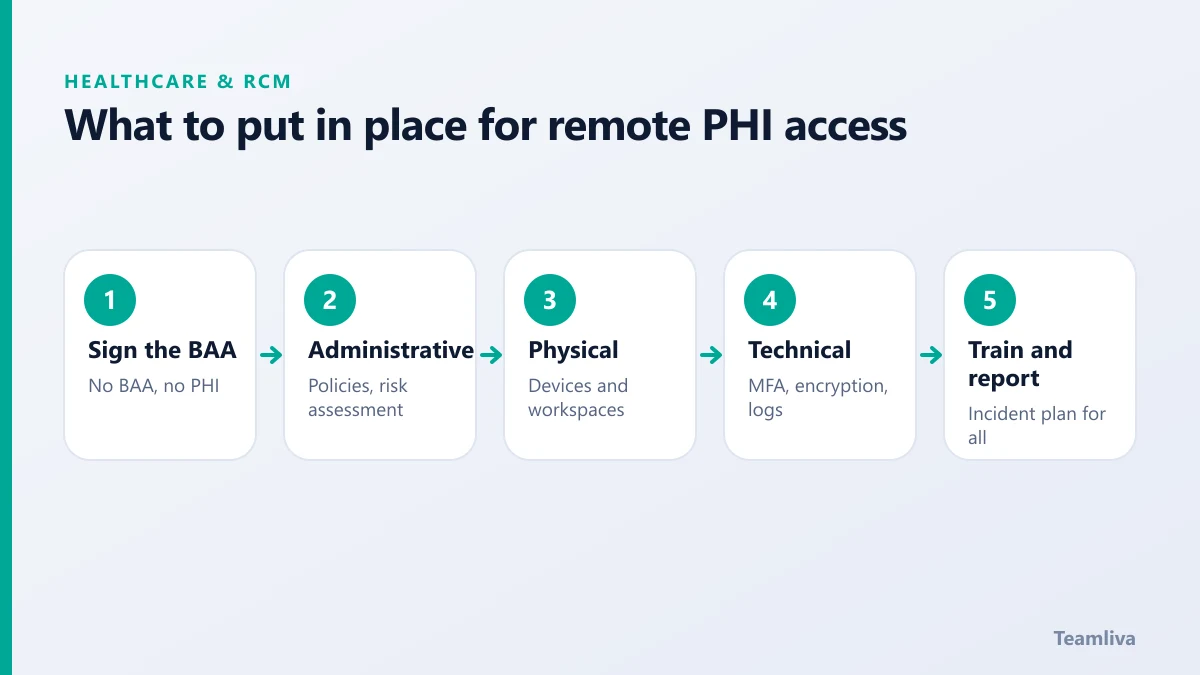
No BAA means no access to PHI. Make that a rule with no exceptions.

The three kinds of safeguards
HIPAA's Security Rule groups protections into three types.
Administrative safeguards
These are policies and people: risk assessments, written procedures, workforce training, sanction policies and incident response plans. A risk assessment is the anchor, because it shows where your real exposure is.
Physical safeguards
These cover the places and devices that hold data. For remote work, that means locked screens, private workspaces and controlled handling of devices.
Technical safeguards
These are the controls in the systems themselves: unique user IDs, access controls, encryption, audit logs and automatic logoff. Together they answer who accessed what, and when.
Practical controls for remote teams
- Use managed, encrypted workstations. Do not allow PHI on personal devices.
- Apply least privilege. Give each role the minimum access it needs.
- Require multi-factor authentication on every system that holds PHI.
- Secure the network. Use a VPN or equivalent, and block PHI from email and consumer file sharing.
- Log and review access. Look for unusual patterns on a regular schedule.
- Train and re-train. Run HIPAA training at onboarding and every year, with short refreshers in between.
- Have an incident plan. Everyone should know how to report a suspected breach, and to whom, on the same day.
Choosing a compliant partner
Ask any outsourcing partner direct questions:
- Will you sign our BAA, or do you offer your own?
- How are workstations configured and monitored?
- How is access granted, reviewed and removed?
- How do you train staff, and how often?
- How would you notify us of an incident?
Vague answers are a warning sign. Our post on questions to ask a billing partner offers more prompts you can adapt.
Where security fits in a remote launch
Security setup is a step in the launch plan, not an afterthought. In Teamliva's healthcare staffing model, agreements and encrypted workstations are completed before a team member starts work. That order protects both sides.

Common HIPAA mistakes in remote work
Most incidents are ordinary, not dramatic. Watch for these:
- Sending PHI over personal email or consumer messaging apps.
- Shared logins, which make it impossible to know who did what.
- Unlocked screens in shared spaces.
- Forgotten access for staff who have changed roles or left.
- No record of training, which is a problem if you are ever audited.
Each of these is fixable with a simple rule and a regular check.
Keeping evidence
Compliance is not only doing the right thing. It is being able to show it. Keep records of your risk assessments, signed agreements, training completion, access reviews and incident reports. When a partner or an auditor asks how you protect PHI, a tidy folder of evidence turns a stressful question into a routine one.
What to do if something goes wrong
Even well-run teams have incidents, so plan for one before it happens. Decide who is contacted first, how quickly a suspected breach must be reported and who investigates. Preserve logs, contain the problem and document each step. Under the HIPAA Breach Notification Rule, affected individuals and regulators may need to be told within set timeframes, so involve your compliance lead or legal counsel early. A calm, practised response protects patients and shows regulators that your programme is real.
Finally, review the programme at least once a year. Roles change, tools change and threats change. A yearly review of agreements, access lists, training records and risk assessments keeps your safeguards matched to how the work is really done, instead of how it was done when the contract was signed.

The takeaway
HIPAA compliance is a shared responsibility. Sign the BAA, apply the safeguards, train people and keep watching the logs. Remote and outsourced work is perfectly workable under HIPAA when the controls are real and reviewed. If you want to talk through your setup, reach out to us.
Frequently asked questions
Do I need a Business Associate Agreement with an outsourcing partner?
Yes. Any vendor that creates, receives, maintains or transmits protected health information on your behalf is a business associate, and a written agreement is required before they handle that data.
Can remote employees work from home under HIPAA?
They can, provided the same safeguards apply: secured devices, protected networks, access controls and trained staff. HIPAA is technology neutral and looks at the risk, not the location.
Who is responsible if a vendor has a breach?
Both parties carry obligations. The covered entity remains responsible for oversight, and the business associate must meet its own duties and report incidents under the agreement.
- #Teamliva
- #TeamLiva
- #MedicalBilling
- #RCM
- #HealthcareBPO
- #Hipaa
- #Compliance
- #DataSecurity
- #RemoteWork