Secure Client Portal Development: Features and Best Practices
A secure client portal lets customers or patients view records, send documents and message your team safely. Learn the essential features, security controls and rollout steps.
In this article
A client portal is a secure, logged-in space where customers, patients or partners can see information and act on it. Instead of sending documents by email and answering the same status questions by phone, you give people a place to self-serve.
Because a portal holds private data, it has to be secure as well as useful. This guide covers both sides.
What a client portal does
A well-designed client portal typically lets users:
- View status and history, such as orders, projects, invoices or appointments.
- Upload and download documents securely.
- Message your team in a traceable thread.
- Update their own details.
- Complete forms and approvals online.
Each function replaces a manual, error-prone exchange. That saves time for both sides.
Features worth building first
Do not try to build everything at once. Start with the tasks that hurt most today.
- Secure login with a clear, simple account flow.
- A dashboard that answers the top three questions users ask.
- Document exchange with version history.
- Notifications by email for events that need attention.
- Search and filters so users find things quickly.
Later releases can add payments, scheduling, integrations and reporting.

Security controls that matter
Security is the reason a portal exists in the first place. Plan these controls from the start.
Authentication and access
Use strong passwords, offer multi-factor authentication and lock accounts after repeated failures. Apply role-based access so each user sees only their own data, and admins see only what their role requires.
Encryption
Encrypt data in transit with current TLS settings and encrypt sensitive data at rest.
Audit logging
Record who accessed or changed what, and when. Logs support investigations and compliance reviews.
Secure development
Test against well-known weaknesses. The OWASP Top Ten lists the most common web risks, and it makes a useful checklist for each release.
Compliance
If the portal handles regulated data, such as patient records, the rules apply to the portal as well. Our note on HIPAA compliance for remote and outsourced teams explains what that involves in practice.
Usability is a security feature
A portal that is hard to use pushes people back to email, which is far less secure. Aim for:
- Clear navigation with plain labels.
- Mobile-friendly layouts, since many users will log in from a phone.
- Accessibility that follows recognised guidelines.
- Fast loading pages, which keep people engaged.
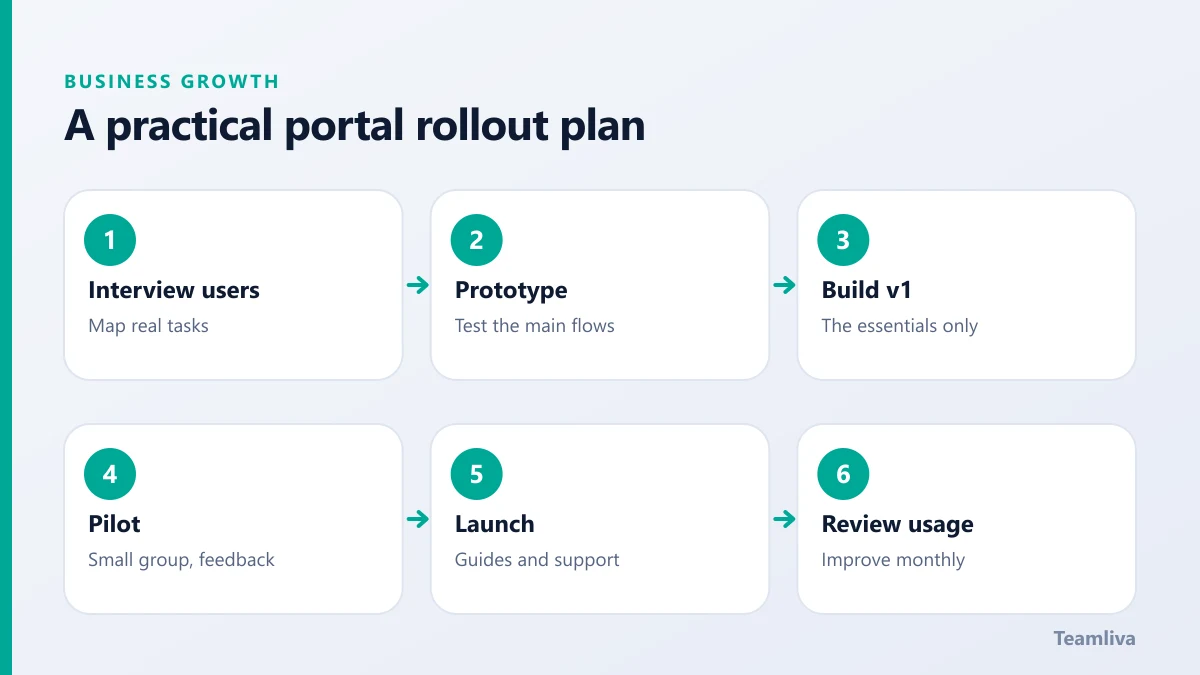
A practical rollout plan
- Interview a few real users and map their tasks.
- Prototype the main flows and test them.
- Build the first release with the essentials.
- Pilot with a small group, gather feedback and fix issues.
- Launch to everyone with clear instructions and support.
- Review usage monthly and plan improvements.
If you need more background on the overall build process, see our guide to planning a custom web application.
Build, buy or configure?
Some portals can be assembled from existing products. Others need custom development because of integration or workflow demands. Weigh setup cost, flexibility, security and long-term ownership. Teamliva's web development team builds secure enterprise portals and can help you decide which route fits.

Measuring whether your portal works
A portal that nobody uses is a cost, not an asset. Track a small set of numbers after launch:
- Adoption, the share of eligible users who have signed in.
- Task completion, such as documents uploaded or forms submitted online.
- Support volume, since a good portal reduces status calls and emails.
- Time to resolve requests, before and after launch.
Talk to users as well. A five-minute call often reveals a confusing label or a missing feature that no dashboard will show.
Maintaining security over time
Security is not a launch task. Keep patching dependencies, review access rights regularly, rotate secrets, back up data and test your recovery plan. Run periodic security testing, and act on the findings. A portal that is quietly maintained stays trustworthy, and trust is what makes people share sensitive information with you.
Choosing what goes in the portal and what stays out
Not every task belongs in a portal. Put the high-volume, repeatable requests there, such as status checks, document exchange and approvals. Keep rare, sensitive or highly personal conversations on the phone or in person. This keeps the portal simple and reduces the amount of sensitive data you store. Collect only what you need, and set retention rules so old documents are archived or deleted on a schedule.
Finally, plan the support model. Users will forget passwords, misplace documents and ask how things work. A short help page, a clear contact route and a fast response to early questions will do more for adoption than any new feature. Treat the first three months as a learning period and keep improving.

The takeaway
A client portal saves time and improves the customer experience when it is easy to use and properly secured. Start with the tasks that matter most, protect data at every layer and grow the portal from real feedback. To explore a portal for your own organisation, talk to us.
Frequently asked questions
What is a client portal?
A client portal is a secure, logged-in area of a website where customers, patients or partners can access information, share documents, track progress and communicate with your team.
What security features should a client portal have?
At minimum: strong authentication with multi-factor options, role-based access, encryption in transit and at rest, audit logs, session controls and regular security testing.
How do we get people to actually use the portal?
Make it solve a real task better than email does, keep sign-up simple, announce it clearly and gather feedback early so the first release fits how people work.
- #Teamliva
- #TeamLiva
- #DigitalMarketing
- #SEO
- #BusinessGrowth
- #ClientPortal
- #WebDevelopment
- #Security
- #EnterprisePortals