Custom Web Application Development: How to Plan a Project
A custom web application can automate your workflow and give customers a better experience. Plan it well with this guide to discovery, design, build, launch and support.
In this article
A custom web application is software built around your own workflow instead of a generic one. It might be a customer portal, an internal operations tool, a booking system or a data dashboard. Done well, it removes manual work and gives users exactly the experience they need.
Done poorly, it runs late, costs more than planned and solves the wrong problem. Planning is what separates the two outcomes.
Should you build a custom web application?
Ask three questions first.
- Does an existing tool already do this? If a product meets most of your needs, adapting your process is often cheaper.
- Is the workflow unique or strategic? Custom software pays off when it supports something competitors cannot copy.
- Do you need integration? If the tool must talk to your other systems, custom work can be the cleaner route.
If the answers point to building, move on to discovery.
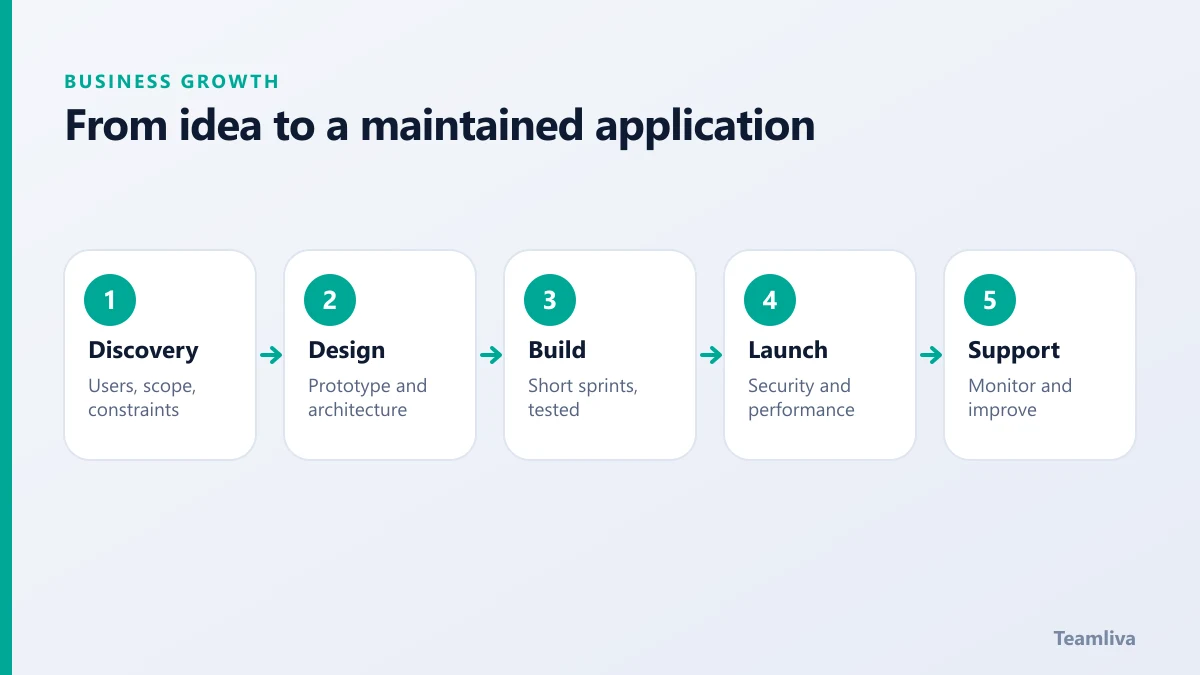
Stage 1: Discovery
Discovery is where most projects are won. Before any design or code, define:
- Who the users are and what they are trying to achieve.
- The core problem in one or two sentences.
- The must-have features for the first release, separate from the nice-to-haves.
- Integrations and data the application depends on.
- Constraints, such as budget, deadlines, compliance and existing systems.
Write the result down. A short, agreed scope document prevents months of drift.

Stage 2: Design
Design covers both the experience and the architecture.
- Wireframes and prototypes let stakeholders react to something tangible before build begins.
- Accessibility should be planned from the start. The Web Content Accessibility Guidelines are the standard reference.
- Architecture decisions, such as how data is stored and how the system scales, are easier to make now than to change later.
Stage 3: Build
Build in short sprints, each ending with something you can see and test. Regular checkpoints keep the project honest.
Good habits during build:
- Ship the smallest useful version first.
- Review working software often, not only at the end.
- Automate tests so changes do not break existing features.
- Keep security in every sprint, not as a final task.
Stage 4: Testing and launch
Before launch, check function, performance and security. Test with real users where possible. Review the application against common risks such as those in the OWASP Top Ten.
Plan the release itself: data migration, monitoring, a rollback route and a short list of people ready to respond on launch day.
Stage 5: Support and improvement
Launch is a starting line. Real usage will reveal improvements you could not foresee. Plan for:
- Monitoring and uptime alerts.
- Security patches and dependency updates.
- Bug fixes and small enhancements.
- A regular review of what users actually do.
Teamliva includes this ongoing stage in its web development services, so the application does not go stale after launch.
Common pitfalls
- Vague scope, which grows without limit.
- No single decision maker on the client side.
- Skipping user testing, then discovering problems after launch.
- Ignoring maintenance costs in the budget.

Connect it to growth
A web application rarely stands alone. Customers still need to find it, which is where SEO for service businesses comes in. Good brand design also helps users trust what they see. Read about brand identity design to see how the pieces fit.
How to budget for a custom web application
Costs vary widely, but the structure is predictable. Plan for these parts:
- Discovery and design, which set direction and reduce rework.
- Development, usually the largest share.
- Testing and security review, which should not be squeezed.
- Hosting and infrastructure, billed monthly or annually.
- Maintenance and improvement, an ongoing cost after launch.
A helpful rule is to ask for a first release that delivers real value, then fund later phases from what you learn. That keeps risk low and spending tied to results.
Questions to ask a development partner
- Can we see similar work and speak to past clients?
- Who will work on our project, and who is our contact?
- How do you handle changes to scope?
- What do we own at the end, including code and documentation?
- How is the application supported after launch?
The answers tell you as much about how a team works as about what it can build.
Choosing a technology approach
Technology decisions should follow the requirements, not fashion. Ask which stack your team can maintain, how well it scales, what integrations exist and how easy it is to hire for later. Prefer mature, well-supported tools for the core of the system. Keep the architecture simple at first, and add complexity only when real usage demands it. A clear, documented codebase also protects you if you ever change development partners.

The takeaway
A custom web application is a good investment when the workflow is unique and the plan is clear. Invest in discovery, build in small steps, test with real users and budget for support. To scope your own project, get in touch.
Frequently asked questions
When do I need a custom web application instead of an off-the-shelf tool?
When your workflow is a real competitive advantage, when off-the-shelf tools force costly workarounds, or when you need deep integration with your own systems and data.
How long does a custom web application take to build?
It depends on scope. A focused first release can take weeks to a few months, and larger platforms take longer. Splitting the work into stages gets a usable version live sooner.
What ongoing costs should I plan for?
Hosting, monitoring, security updates, bug fixes and improvements. Budget for maintenance from the start, because software that is not maintained becomes a risk.
- #Teamliva
- #TeamLiva
- #DigitalMarketing
- #SEO
- #BusinessGrowth
- #WebDevelopment
- #CustomSoftware
- #ProjectPlanning
- #WebApplications