Website Design for Service Businesses: What Turns Visitors into Enquiries
A service business website has one job: turn visitors into enquiries. These design and content principles make your site clearer, faster and more persuasive.
In this article
Many service businesses treat their website like a brochure. It sits there, looks fine and quietly fails to bring in work. Effective website design for service businesses starts from a different question: what does a visitor need to see to feel confident enough to get in touch?
Here are the principles that answer it.
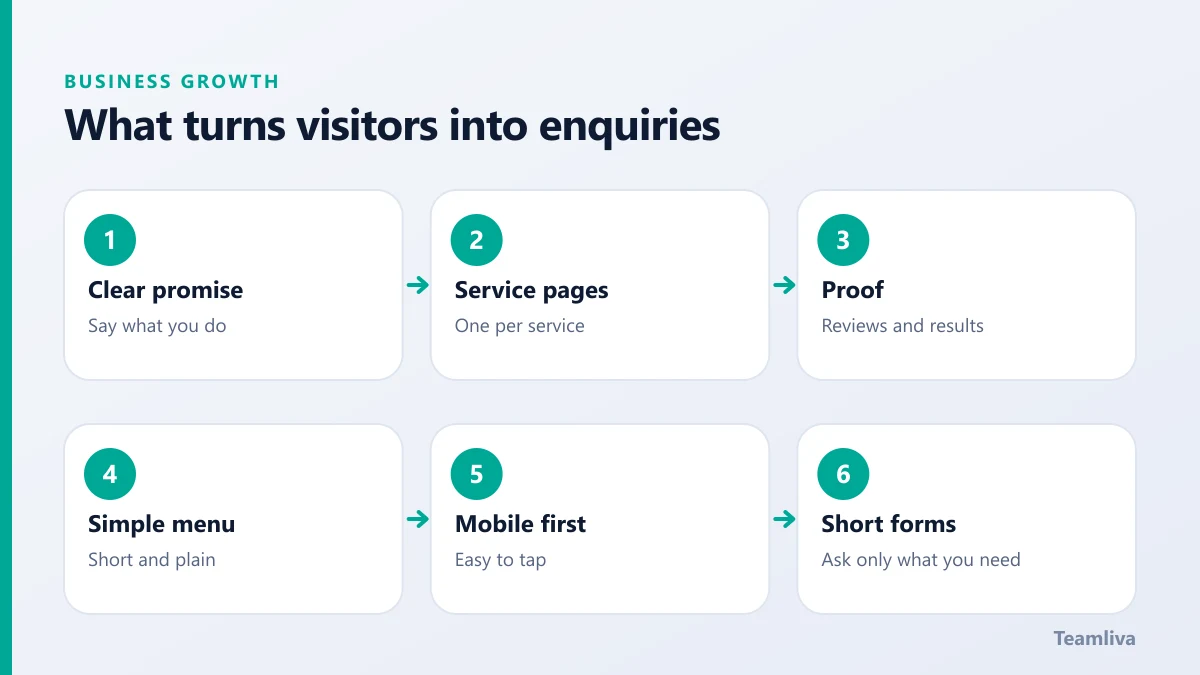
Lead with a clear promise
Within a few seconds, a visitor should know what you do, who you do it for and what to do next. Put that in the top section of the home page.
- A specific headline. "Remote billing support for US medical practices" beats "Solutions that work".
- One sentence of proof or detail. Mention your approach or your results.
- One primary button. "Request a quote" or "Book a call" should be easy to spot.
Structure the site around your services
Give every main service its own page. It helps visitors find what they need and helps search engines understand what you offer. A strong service page includes:
- What the service is and who it is for.
- How the process works, step by step.
- Proof, such as examples, reviews or numbers you can support.
- Answers to common questions.
- A clear call to action.
Our own medical billing and RCM page follows this pattern.

Show proof and build trust
People hire service businesses they trust. Show why they should trust you:
- Client reviews and short case studies.
- Certifications, memberships and standards you follow.
- Real photos and names of the team.
- A clear explanation of your process and guarantees.
Avoid vague claims. Specific, honest details persuade better than superlatives.
Make navigation simple
Keep the main menu short and predictable. Use plain labels such as Services, About, Blog and Contact. Put your contact route in the header and repeat it at the end of each page.
Design for mobile first
Many visitors will arrive on a phone. Check that text is readable, buttons are easy to tap and forms are short. Test the whole enquiry flow on a real device.
Keep forms short
Every extra field lowers the number of people who finish. Ask only for what you need to respond, such as name, email, phone and a short message. Explain what happens next, for example how quickly you reply.
Speed and accessibility
- Compress images and use modern formats.
- Limit heavy scripts and third-party widgets.
- Use readable contrast and clear headings.
- Add alt text to images.
Accessibility improves usability for everyone. The Web Content Accessibility Guidelines are the standard reference.
Build for search from the start
Good design and good search performance go together. Use descriptive page titles, clear headings, fast loading and useful content. Read our SEO for service businesses beginner's guide for the next steps, and the Google Search Central starter guide for official advice.
Publish helpful content
A blog that answers real customer questions builds trust and brings in search visitors. Each article should link to the relevant service page, as this one does, and end with a clear next step. See digital marketing for small business for how content fits with the wider plan.

Common mistakes
- Vague headlines that could describe any business.
- Hiding the contact details.
- Long forms and slow pages.
- Stock photos that say nothing about you.
- Never updating the site.
A homepage checklist for website design for service businesses
Use this list when you review your own site.
- The headline says what you do and who you do it for.
- The main call to action is visible without scrolling.
- Three to five key benefits are explained in plain language.
- Proof appears early: a review, a client logo you have permission to show or a short result.
- Every service has a clear link.
- Contact details are easy to find, on every page.
- The page loads quickly on a mobile connection.
Calls to action that work
A call to action tells the visitor what to do next. Make it specific and low-pressure.
- Use plain verbs. "Request a quote" or "Book a call" are clearer than "Submit".
- Match the stage. A visitor who is only researching may prefer a guide or a checklist to a sales call.
- Repeat it sensibly. Place it at the top, in the middle and at the end of long pages.
- Explain what happens next. For example: "We reply within one business day."
Measuring your site
Set up basic analytics and watch a few figures each month: visits by source, the pages people leave from and the number of completed enquiries. If a page gets traffic but few enquiries, improve its headline, proof and call to action. Test one change at a time so you know what worked.
Keep the site fresh
Outdated pages damage trust. Review your services, prices, team details and contact information every quarter, and update your blog with helpful posts. A living site tells customers that the business is active and reliable.
How Teamliva helps
Teamliva designs and builds fast, search-friendly websites and custom web applications, and supports them with branding and digital marketing. See our web development services and graphic design services, or contact us to talk about your site.

The takeaway
Website design for service businesses works when it is clear, fast and trustworthy. Lead with a promise, structure pages by service, show proof and make the next step obvious.
Frequently asked questions
How many pages does a service business website need?
Most need a home page, one page per main service, an about page, a contact page and proof such as reviews or case studies. Add a blog when you can publish helpful content steadily.
What makes a service website convert better?
A clear promise at the top, simple navigation, visible proof, one obvious next step on every page and a fast, mobile-friendly experience.
How important is site speed?
Very. Slow pages frustrate visitors and can weaken search performance. Compress images, limit heavy scripts and test on mobile connections.
- #Teamliva
- #TeamLiva
- #DigitalMarketing
- #SEO
- #BusinessGrowth
- #WebsiteDesign
- #ServiceBusiness
- #Conversion
- #WebDevelopment