Virtual Assistant Data Security: Protecting Your Business Information
Giving someone remote access means trusting them with data. These practical controls protect customer and business information when you work with a virtual assistant.
In this article
Every time you delegate, you share some information. Customer lists, invoices, calendars and internal files all pass through someone else's hands. That is normal and manageable, but only with sensible controls.
This guide explains virtual assistant data security in practical terms, without jargon.
Start with the principle of least access
Give your assistant access to what the job needs and nothing more. If they handle scheduling, they do not need your bank login. If they answer support email, they may not need full customer payment history.
Review access whenever the role changes and remove it promptly when it ends.
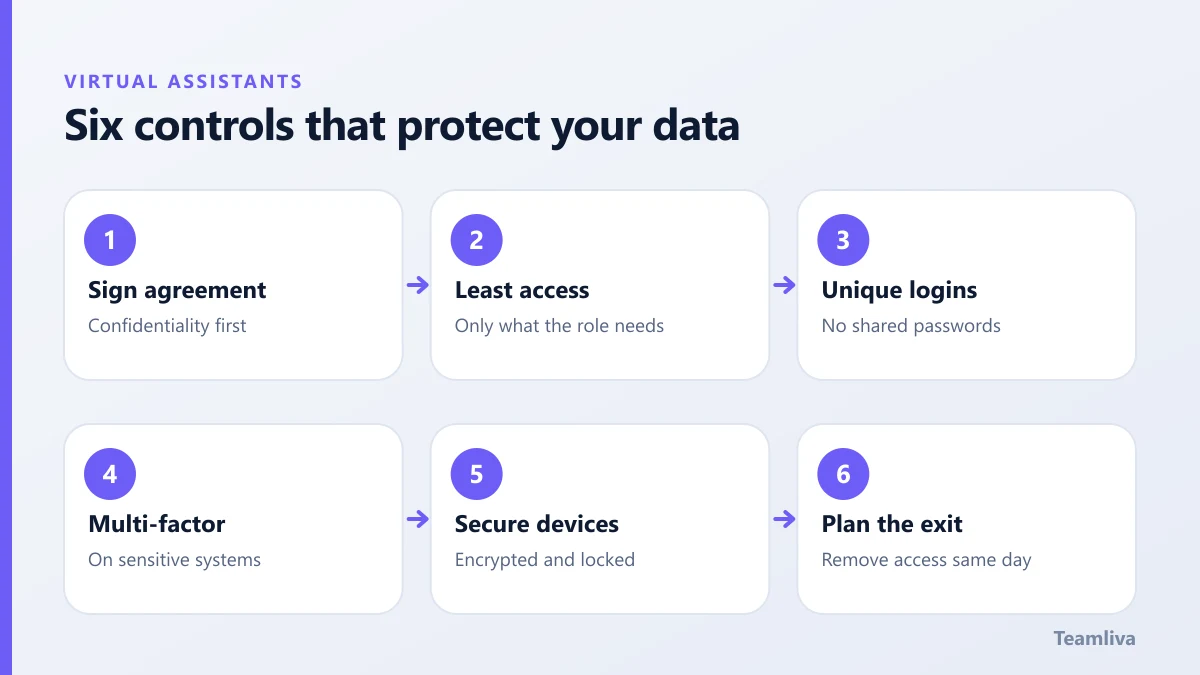
The core controls
1. A written confidentiality agreement
Sign it before sharing anything. It should define confidential information, limit its use to the agreed work and require secure handling. Have a qualified adviser check it for your jurisdiction.
2. Unique logins, never shared passwords
Create separate accounts with role-based permissions. This lets you see who did what and revoke access instantly. A password manager makes this easier for everyone.
3. Multi-factor authentication
Turn it on for email, cloud storage, accounting and any system with sensitive data. It blocks most attacks that rely on stolen passwords.
4. Secure devices and connections
Ask that work happens on devices with up-to-date software, disk encryption and screen locks. Avoid public Wi-Fi for sensitive tasks, or require a secure connection.
5. Keep data where it belongs
Store files in approved cloud folders, not on personal drives or in chat threads. Avoid sending sensitive documents as email attachments where a secure link will do.
6. Training and clear reporting
Make sure your assistant knows how to spot phishing emails and who to tell if something goes wrong. Fast reporting limits damage.

Extra care for health information
If your business handles patient data, the bar is higher. In the United States, HIPAA requires safeguards such as a Business Associate Agreement, access controls, audit trails and staff training. The official summary is available from the US Department of Health and Human Services. We explain the practical setup in HIPAA compliance for remote teams and in our guide to the medical virtual assistant role.
A quick security checklist
Before your assistant starts, confirm:
- Agreement signed.
- Individual accounts created with limited permissions.
- Multi-factor authentication enabled.
- Approved storage location agreed.
- Contact for reporting incidents shared.
- Offboarding steps written down.
Plan for the end as well
Security does not stop when the work does. When an engagement finishes:
- Remove access to every system the same day.
- Change any shared credentials that were ever used.
- Confirm that files held on the assistant's devices are deleted.
- Keep a record of what was done.
Spotting phishing and social engineering
Attackers often target the person with less experience or less training. Train your assistant to be cautious about:
- Emails that create urgency, such as "pay this invoice today".
- Requests to change bank details or send documents to a new address.
- Links that lead to login pages you did not expect.
- Attachments from unknown senders.
The rule is simple: verify by another channel before acting. A quick call or a message in your chat channel can stop a costly mistake. The Cybersecurity and Infrastructure Security Agency shares free tips on its website.

Handling a suspected incident
Agree in advance what to do if something goes wrong.
- Stop and report at once. Do not try to hide it.
- Change the affected passwords and end active sessions.
- Note what happened, when and which systems were involved.
- Tell anyone who must be told, such as customers or regulators, according to your legal duties.
- Learn from it and update the checklist.
A calm, blame-free process encourages fast reporting, which limits damage.
Keeping the virtual assistant data security checklist alive
Security drifts unless it is reviewed. Once a quarter, check who has access, remove anything unused and confirm that multi-factor authentication is still enabled. Review your written rules whenever tools or tasks change. A short review takes minutes and prevents most long-term surprises.
Managed providers can raise the baseline
A managed provider can supply controls that are hard to arrange one person at a time: secured workstations, access logging, standard agreements and staff training. At Teamliva, remote professionals work on managed, secured environments and under confidentiality terms from day one. See our BPO and staffing solutions for details, or contact us with your requirements.
Quick reference: security habits to keep
Print these and keep them near the team.
- Use unique logins, and never share passwords in chat or email.
- Turn on multi-factor authentication for every important system.
- Lock the screen whenever you step away.
- Keep work files in approved storage only.
- Check unexpected requests through a second channel.
- Report mistakes at once, without blame.
Repeating a short list is more effective than a long policy that nobody reads. Review it together each quarter.

The takeaway
Virtual assistant data security comes down to a few habits: sign agreements, limit access, use unique logins with multi-factor authentication, secure devices and plan the exit. With those in place, you can delegate confidently. For a wider view of the model, read what a virtual assistant is.
Frequently asked questions
Should I share my own passwords with a virtual assistant?
No. Give each person their own login with only the permissions they need. Shared passwords make it impossible to track who did what and are hard to revoke safely.
What should be in a confidentiality agreement?
It should define what counts as confidential information, restrict its use to the agreed work, require secure handling and say what happens when the engagement ends. Ask a qualified adviser to review the wording for your location.
What if my business handles health information?
Stricter rules apply. In the United States that means HIPAA safeguards, including a Business Associate Agreement, limited access, secure devices and staff training.
- #Teamliva
- #TeamLiva
- #VirtualAssistant
- #VirtualAssistantServices
- #HireAVirtualAssistant
- #DataSecurity
- #Confidentiality
- #Compliance