What Is a Virtual Assistant? A Complete Guide for Businesses
A virtual assistant is a remote professional who handles admin, support and operations work so you can focus on growth. Here is what they do, who needs one and how to start.
In this article
A virtual assistant is a trained professional who supports your business remotely. They work from their own location, use secure online tools and take on tasks you would otherwise do yourself or hire someone in the office to do.
The idea is simple. You keep the work that needs your judgement. The assistant takes the repeatable work that fills your day.
What a virtual assistant actually does
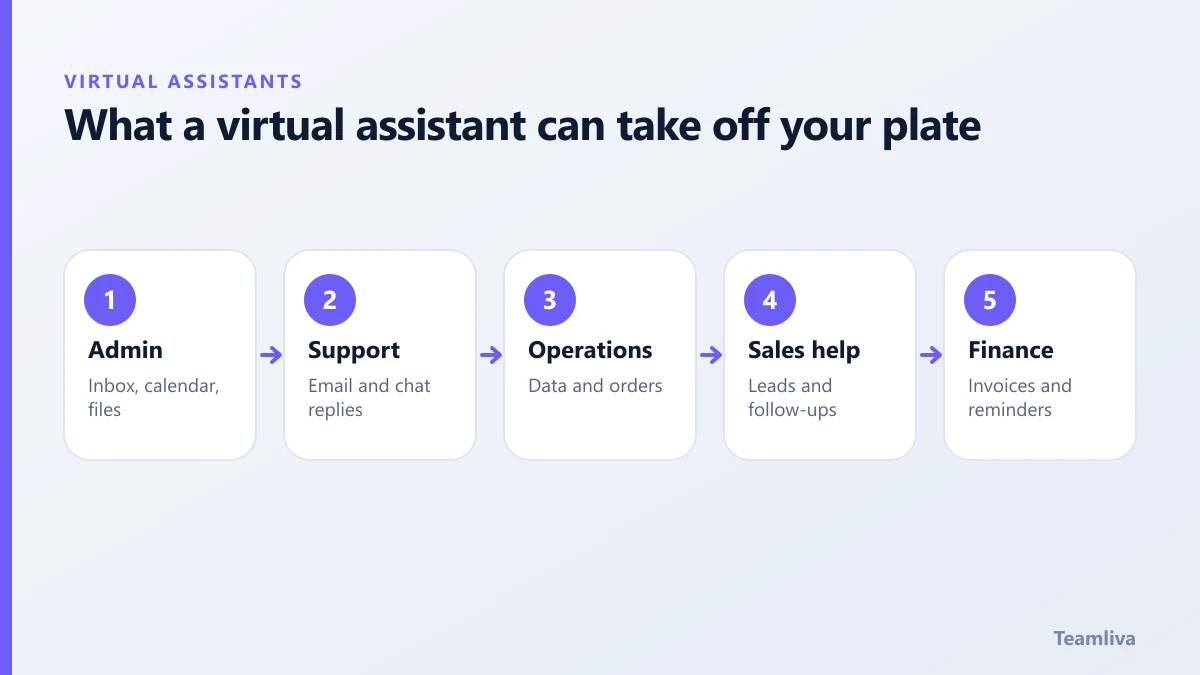
The role is defined by you, not by a fixed job title. Common areas include:
- Administrative support. Inbox triage, calendar management, travel booking, document preparation and meeting notes.
- Customer support. Answering email and chat, updating tickets and passing complex issues to the right person.
- Data and operations. Data entry, order processing, spreadsheet updates and report preparation.
- Sales and marketing support. Lead research, list building, scheduling posts and following up on enquiries.
- Finance support. Invoice preparation, expense tracking and payment reminders, working under your accounting rules.
For a longer list, see our guide to virtual assistant tasks you can delegate.
Who benefits most from a virtual assistant
You do not need a large company. This model is a good fit when:
- Your calendar is full of tasks that do not need your expertise.
- Work is piling up because nobody owns it.
- You want to add capacity without a long hiring process or office costs.
- You need coverage across time zones or extended hours.
Healthcare practices, agencies, online stores, consultancies and startups all use this model. A medical virtual assistant, for example, can handle scheduling, insurance verification and patient reminders.

Virtual assistant, freelancer or employee?
These options overlap, but they are not identical. A freelancer usually works for many clients and sets their own hours. An employee is part of your payroll and your office culture. An assistant placed through a managed provider sits in between, with a dedicated person and a team behind them. We compare the three in virtual assistant vs employee vs freelancer.
How to work with an assistant successfully
Most disappointments come from unclear expectations, not from the person. A few habits make a large difference:
- Write down the process. Even a short checklist beats verbal instructions.
- Start with one clear workflow. Prove it works, then add more.
- Agree how you will communicate. Decide on one main channel and a daily or weekly check-in.
- Set measurable targets. Response times, accuracy and turnaround are easy to track.
- Give feedback quickly. Early corrections save weeks later.
Security and confidentiality
Any assistant who touches customer or company data needs clear rules. That means signed confidentiality terms, access limited to what the role needs, and secure, managed devices where the data is sensitive. If you handle health information, the standards are stricter. The US Department of Health and Human Services explains them on its HIPAA information pages.
Types of virtual assistant roles
Not every assistant does the same job. Knowing the main types helps you ask for the right skills.
- General administrative assistant. Handles email, calendars, documents and day-to-day coordination.
- Customer support assistant. Works in your help desk, answers questions and follows your policies.
- Industry specialist. Brings knowledge of a field, such as healthcare administration, bookkeeping or e-commerce operations.
- Technical or creative assistant. Supports website updates, design tasks or content formatting under your direction.
Many businesses start with a general role, then add specialists as the workload becomes clearer.

Signs it is time to get help
You do not need a crisis to justify support. Look for these signals:
- You answer messages late at night because the day was full of other tasks.
- Small jobs keep slipping because nobody owns them.
- You have turned down growth because there is no time to deliver it.
- Your best staff spend hours on work that does not need their skills.
If two or more of these feel familiar, start with a short list of tasks and try a pilot. The US Small Business Administration offers general planning material in its business guide if you want to think through the wider picture.
What good results look like
After the first month, you should see fewer unanswered messages, cleaner records and more of your own time on work that grows the business. If nothing has changed, review the instructions before blaming the person. Unclear briefs are the most common cause of poor results.
How Teamliva helps
Teamliva provides trained remote professionals in managed teams, from a single dedicated specialist up to a group of ten or more. Each person is assessed before they start, works to agreed service levels and has a named team lead behind them. You can explore the model on our BPO and staffing solutions page.

The takeaway
A virtual assistant is a practical way to add capacity and reclaim your time. Define one workflow, write it down, set targets and build from there. When you are ready to talk through your own needs, contact our operations desk.
Frequently asked questions
What does a virtual assistant do?
A virtual assistant handles remote support work such as email and calendar management, data entry, customer support, scheduling, research, bookkeeping support and social media coordination. The exact scope depends on the role you define.
Do I need to be a large business to use a virtual assistant?
No. Solo founders, small practices and growing teams all use virtual assistants. The question is not company size. It is whether you have repeatable tasks that steal time from higher-value work.
Is a virtual assistant the same as a chatbot?
No. A virtual assistant in this sense is a real person who works remotely. An AI chatbot or voice assistant is software. Many teams use both, with people handling judgement and relationships.
- #Teamliva
- #TeamLiva
- #VirtualAssistant
- #VirtualAssistantServices
- #HireAVirtualAssistant
- #RemoteStaffing
- #Delegation
- #SmallBusiness