Virtual Assistant for Small Business: How to Grow Without Burnout
Small business owners wear every hat. A virtual assistant for small business takes on the repeatable work so you can sell, serve customers and plan growth.
In this article
Running a small business means doing a hundred jobs before lunch. Sales, invoicing, customer messages, scheduling and social media all land on the same person. That is a fast route to burnout.
A virtual assistant for small business is one of the most practical ways to change that. Here is how to use one well.
The real cost of doing everything yourself
Time spent on low-value tasks has a price, even if it does not appear on an invoice. Every hour you spend on data entry is an hour not spent on customers, product or strategy. Over a year, that adds up to a large amount of lost focus.
The goal is not to work less. It is to spend your hours where they have the most impact.
What to delegate first
Look for work that is repeatable and rules-based. Good starting points for a virtual assistant for small business include:
- Inbox and calendar management.
- Customer enquiries and follow-ups.
- Invoicing and payment reminders.
- Data entry and spreadsheet updates.
- Social media scheduling and basic content formatting.
- Lead research and CRM updates.
Our list of virtual assistant tasks to delegate has more ideas by department.

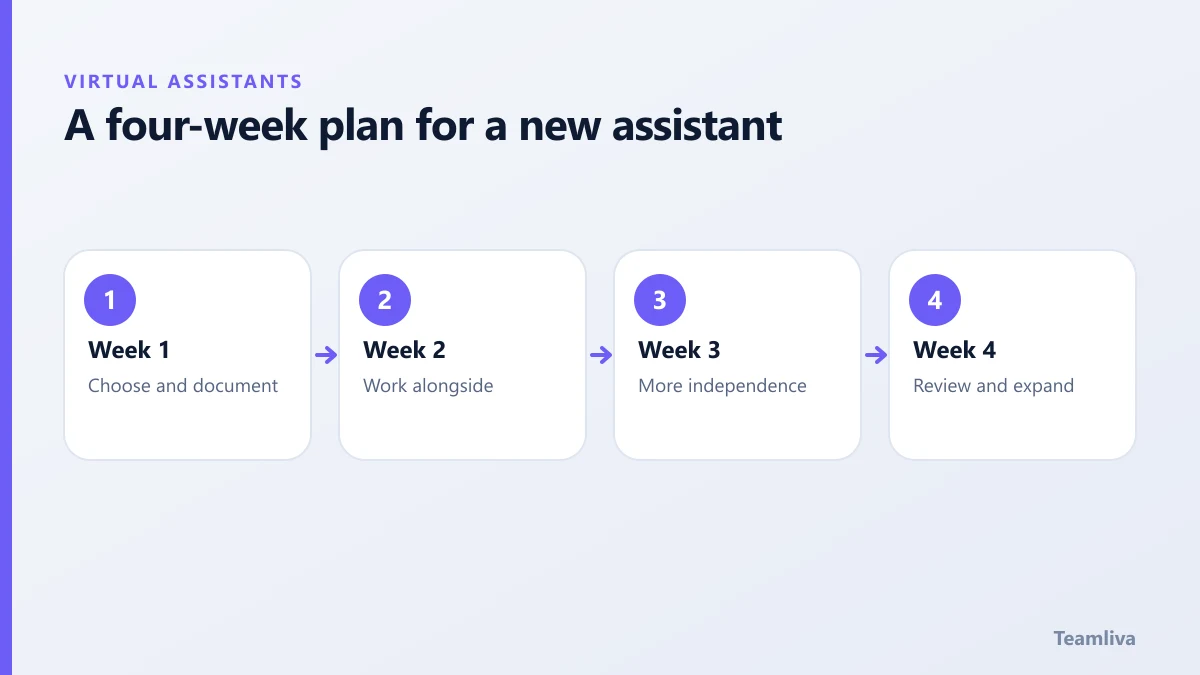
A four-week plan
Week 1: Choose and document
Pick one workflow. Write the steps, the rules and what "done" looks like. A screen recording is often faster than a long document.
Week 2: Work alongside
Have the assistant complete tasks while you review each one. Correct early and explain why.
Week 3: Give more independence
Move to spot checks. Agree what can be decided alone and what needs your approval.
Week 4: Review and expand
Look at time saved and quality. Then decide whether to add a second workflow or more hours.
Our guide to onboarding a virtual assistant expands on this plan.
Budgeting sensibly
Think in terms of the value of the time you reclaim. If an hour of your time is worth much more than the assistant's hourly cost, delegating pays for itself once you use that hour well. Compare pricing models, such as hourly, monthly retainer and dedicated arrangements, in our article on virtual assistant cost and pricing models.
Protect what matters
Even a small business handles sensitive information: customer details, payment records and internal documents. Give access only where needed, use unique logins with multi-factor authentication and agree confidentiality terms in writing. The US Federal Trade Commission offers practical guidance in its small business cybersecurity resources.
Where your website fits in
Many owners find that the same admin overload slows their marketing. A clear website and steady content help customers find you. See website design for service businesses for the essentials.
Signs your virtual assistant for small business is working
Look for practical proof rather than a feeling:
- Customer messages get answered faster.
- You open your inbox less often, and it is calmer when you do.
- Invoices go out on time and payments arrive sooner.
- You have finished projects you had been putting off.

A worked example
Picture a three-person design studio. The owner spends about eight hours each week on invoices, scheduling and chasing feedback. She hands those tasks to an assistant for a small block of hours. Within a month, invoices are sent the day work finishes, and she uses the recovered time to pitch two new clients. The assistant did not do anything glamorous. The value came from consistent, reliable execution of small tasks.
Questions to ask before you start
- Which three tasks eat most of my week?
- Can I explain those tasks in a page or a short video?
- What could go wrong, and how would I notice?
- What is one measurable goal for the first month?
Answer these honestly and your first month will go far more smoothly. If you want structured help choosing, talk to us and we will help you scope the role.
Scaling beyond one assistant
As you grow, one person may not be enough. Teamliva can provide a managed team, from a single dedicated specialist to a group of ten or more, so support scales with demand. Read about how to scale your business with a remote team or contact us to discuss your situation.
Quick recap for busy owners
If you are short on time, follow this order.
- List the three tasks that take most of your week.
- Pick the one that repeats most often and can be explained in writing.
- Record a short video of yourself doing it, and note the rules.
- Start with a small block of hours, and review every task in the first week.
- Track time saved and errors for a month, then decide what to add.
Progress comes from consistency, not from handing over everything at once. A steady, well-documented start protects your customers and your peace of mind.

The takeaway
Start small, delegate one workflow, document it clearly and review often. A virtual assistant for small business gives you back the time and energy to grow.
Frequently asked questions
How many hours should a small business start with?
Many owners start with a small block of hours each week focused on one workflow. Once the process is stable and the value is clear, you can increase the hours or add a second workflow.
Will a virtual assistant replace my staff?
Usually not. A virtual assistant is more often used to add capacity and take routine work away from staff, so the team can focus on customers and higher-value tasks.
How do I know if it is working?
Track time reclaimed, response times, error rates and whether deadlines are being met. If you are spending less time on admin and more on growth, it is working.
- #Teamliva
- #TeamLiva
- #VirtualAssistant
- #VirtualAssistantServices
- #HireAVirtualAssistant
- #SmallBusiness
- #Productivity
- #Growth