How to Manage a Virtual Assistant Remotely and Get Great Results
Managing remote support does not need constant meetings. Use clear tasks, a steady rhythm and simple metrics to manage a virtual assistant and keep quality high.
In this article
Working with someone you cannot see can feel uncertain at first. Will they work well? How will you know? The truth is that you can manage a virtual assistant effectively without constant supervision, as long as the basics are in place.
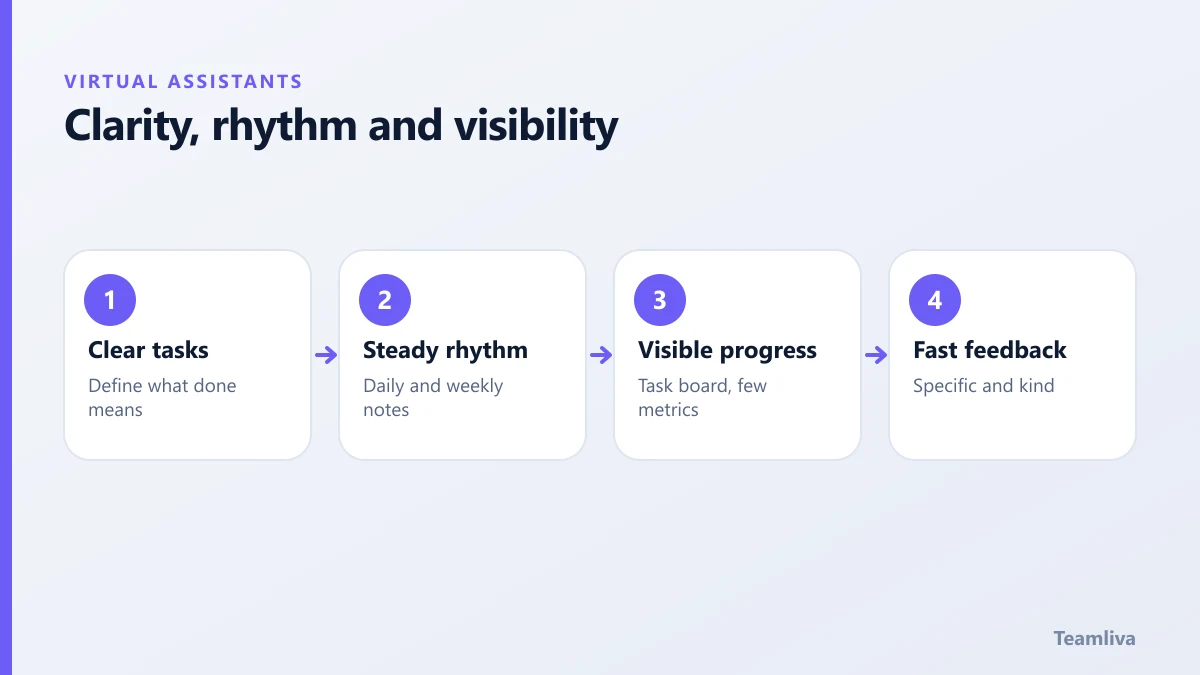
Good remote management rests on three things: clarity, rhythm and visibility.
Clarity: make expectations easy to see
Most problems start with unclear instructions. Fix that first.
- Write the process. A short checklist or a screen recording removes guesswork.
- Define "done". State the format, the quality bar and the deadline.
- Set decision limits. Say what the assistant can decide alone and what needs a quick approval.
- Keep a single source of truth. Store instructions in one shared place, and update them when things change.
Our guide to onboarding a virtual assistant shows how to set this up in the first month.
Rhythm: create predictable communication
A steady routine removes anxiety for both sides.
- Daily start or end note. A brief message on what was done and what is next.
- Weekly review. Thirty minutes to look at results, blockers and priorities.
- A clear channel for urgent matters. Decide what counts as urgent and how to reach you.
- Agreed working hours. Include the overlap with your time zone.
Avoid the trap of constant messages. If you check in every hour, you are still doing the work.

Visibility: see progress without hovering
You do not need to watch someone's screen. You need to see outcomes.
- Use a shared task board with statuses such as to do, in progress and done.
- Ask for short written updates on completed work.
- Track a few measures that match the role. For support, that might be response time and accuracy. For admin, turnaround and error rate.
Keep the list short. Three good measures beat ten confusing ones.
Give feedback that improves the work
Feedback is the main lever you have.
- Be quick. Feedback on the same day sticks best.
- Be specific. Point to the example, not the personality.
- Explain why. Understanding the reason lets the assistant apply it next time.
- Recognise good work. People repeat what is noticed.
- Update the guide. If a mistake happened, fix the instructions too.
Build trust and independence
As results become reliable, reduce your involvement. Move from reviewing everything to spot checks. Give more decision authority on low-risk tasks. Extend the scope gradually. See virtual assistant tasks to delegate for ideas on what to hand over next.
Protect your data while you delegate
Independence should never mean loose access. Grant the minimum access needed, use unique logins with multi-factor authentication and review access regularly. The virtual assistant data security guide explains the practical steps. For general remote-work guidance, the Cybersecurity and Infrastructure Security Agency publishes free resources.
Tools that keep remote work simple
You need fewer tools than you think. A small set, used consistently, does the job.
- A shared task board. Each task has an owner, a due date and a status.
- A chat channel. Use one place for quick questions, and keep it tidy.
- A shared document library. Store instructions, templates and policies in one folder.
- A password manager. It lets you share access safely without sharing passwords in messages.
- Screen recording. Short videos explain processes faster than long documents.

How to manage a virtual assistant across time zones
Distance is easier when you plan for it.
- Agree an overlap window. Even one or two hours of shared time makes live questions possible.
- Write handovers. End each day with a note listing what is done, what is blocked and what is next.
- Batch your feedback. Give feedback at a set time instead of in scattered messages.
- Respect local holidays. Put them in the shared calendar at the start of the year.
- Keep urgent and non-urgent separate. Decide what qualifies as urgent and how to reach you.
Warning signs to act on early
Watch for missed deadlines with no explanation, answers that avoid questions, drifting quality or long silences. Raise the issue promptly, and describe what you noticed rather than assuming a cause. Most problems fix quickly when they are named early, and most turn out to be gaps in instructions or access.
When you want management support built in
Some owners prefer not to run the day-to-day. With Teamliva, each professional works under agreed service levels and a named team lead who handles supervision, quality checks and backup. That leaves you to set priorities and review results. Explore our BPO and staffing solutions or get in touch.
A simple weekly rhythm
A predictable week keeps remote work calm.
- Monday: share the priorities for the week and any deadlines.
- Midweek: a short check on blockers, with feedback on recent work.
- Friday: a written summary of what was completed, what is pending and what is planned.
Add a monthly conversation about the bigger picture: whether the scope is right, what to add or remove and what would make the collaboration easier. Small, regular conversations prevent large misunderstandings.

The takeaway
To manage a virtual assistant well, be clear about the work, keep a steady communication rhythm and measure outcomes rather than hours online. Give fast, specific feedback and extend trust as results earn it.
Frequently asked questions
How often should I check in with a virtual assistant?
Daily short check-ins work well in the first two weeks. After that, many teams move to a weekly meeting plus written updates as work is completed.
What tools help manage remote work?
A shared task board, a chat tool, a shared document library and a simple time or output report cover most needs. Keep the number of tools small.
How do I handle mistakes?
Treat them as a signal that the instructions or process need improving. Explain the fix, update the written guide and check the next few tasks closely.
- #Teamliva
- #TeamLiva
- #VirtualAssistant
- #VirtualAssistantServices
- #HireAVirtualAssistant
- #RemoteManagement
- #Communication
- #Productivity