AI Assistant vs Human Virtual Assistant: What Should You Use?
AI tools can draft, summarise and schedule, but a human virtual assistant brings judgement and accountability. Learn what to automate and what to delegate.
In this article
AI assistant vs human virtual assistant: an AI assistant is best for fast, repeatable, low-risk tasks, while a human virtual assistant is best for judgement, accountability and context. Most small businesses get the strongest results by having a person supervise and improve AI-assisted workflows.
AI tools can now draft emails, summarise meetings, transcribe calls and suggest replies. That raises a fair question for any small business: do you still need a human virtual assistant? The practical answer is that they solve different problems, and the best results come from combining them thoughtfully.
What AI assistants do well
AI tools are strongest where work is repetitive, rules-based and low-risk:
- Drafting first versions of routine emails and documents.
- Summarising long threads, notes and transcripts.
- Transcribing calls and extracting action items.
- Sorting and tagging incoming messages.
- Answering common questions from an approved knowledge base.
Used well, these save real time. Used carelessly, they produce confident errors.
What a human virtual assistant does better
A person adds things software still handles poorly:
- Judgement: deciding what matters when instructions are incomplete.
- Accountability: owning an outcome and telling you when something is wrong.
- Context: remembering your preferences, customers and history.
- Relationships: handling sensitive conversations with tact.
- Cross-tool work: moving between systems, portals and phone calls that resist automation.
See our list of tasks a virtual assistant can take on for examples that need a human.

A decision framework
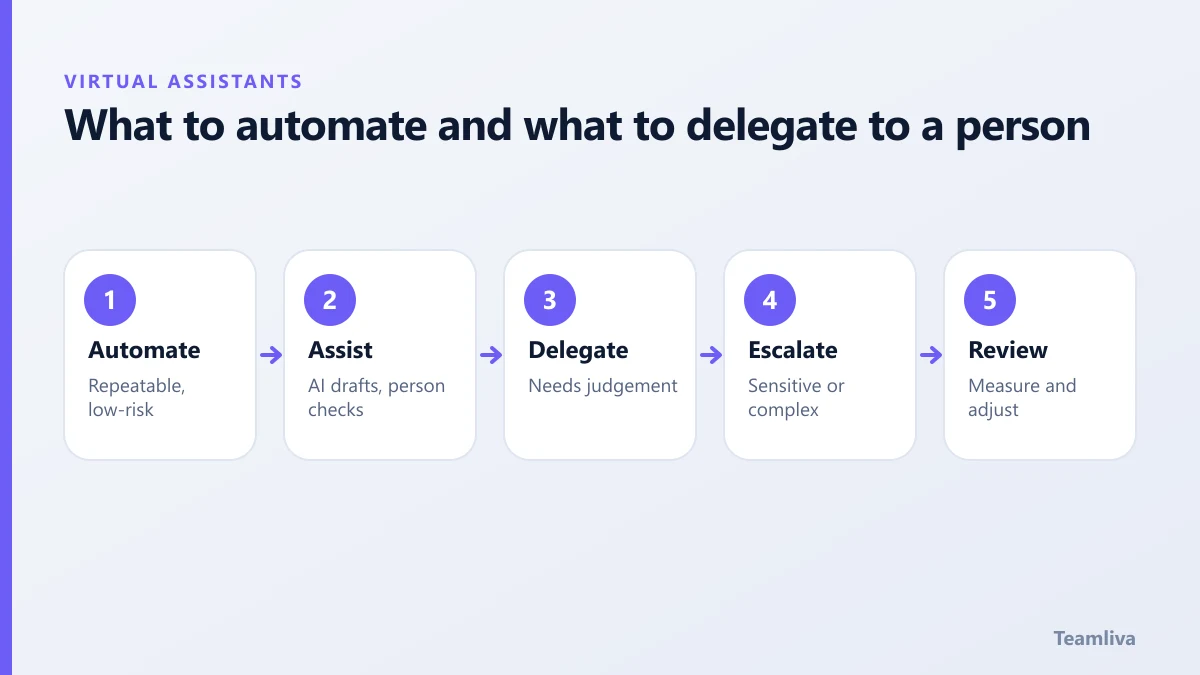
Ask four questions about each task:
- Is it repeatable with clear rules? If yes, consider automation.
- What is the cost of a mistake? High cost means a human must review.
- Does it involve sensitive data? If so, check legal and security rules first.
- Does it need empathy or negotiation? Keep a person in charge.
The strongest setup: a person who uses AI
Rather than choosing, many teams ask their virtual assistant to use AI tools under supervision. The assistant drafts faster, checks every output, and keeps a record of what worked. You get speed and accountability. This also makes the assistant more valuable over time, because they improve your workflows, not just complete them.
Risks to manage
- Accuracy: AI can invent facts. Always verify names, numbers, dates and claims.
- Confidentiality: do not paste customer or patient data into tools that are not approved for it. For health data, review the HHS HIPAA guidance and your vendor agreements.
- Tone: AI output can sound generic. A person keeps your voice consistent.
- Over-automation: removing the human from a customer conversation can damage trust.
Read our note on virtual assistant data security to set clear rules on what can be shared.
Examples of the two working together
- Support inbox: AI suggests replies; the assistant edits and sends, and escalates unusual cases.
- Meetings: AI transcribes; the assistant writes the summary and follows up on actions.
- Research: AI collects sources; the assistant checks them and prepares a brief.
- Scheduling: software finds slots; the assistant handles conflicts and VIP requests.

Where AI assistants fall short
- Facts and figures: AI can produce fluent text that is simply wrong. Every number and name needs checking.
- Context: an AI tool does not know that a customer complained last week or that a supplier is late unless you tell it.
- Accountability: software cannot be held responsible, and it will not tell you when it is out of its depth.
- Multi-step, cross-system work: phone calls, portals and unusual forms often still need a person.
A safe way to introduce AI to your assistant’s work
- Pick one task, such as drafting replies to common questions.
- Set rules on data: what may and may not be pasted into any tool.
- Require review: the assistant checks and edits every output before it is sent.
- Track results for a month: time saved, errors caught, customer feedback.
- Document what works in the shared guide so the method survives staff changes.
How this changes the hiring brief
When you hire a virtual assistant today, it is reasonable to ask about comfort with AI tools, attention to accuracy and willingness to follow data rules. Look for someone who treats AI as a fast first draft, not an authority. You can add these points to your job description and test them in the paid task.
Key takeaways: AI assistant vs human virtual assistant
- AI assistant vs human virtual assistant is not either-or: let AI draft and a person check, own and improve the workflow.
- Automate repeatable, low-risk work, and keep a person in charge of anything sensitive, high-cost or emotional.
- Verify every number, name and claim that AI produces before it reaches a customer.
- Set clear rules on what data may be pasted into any AI tool, especially health and financial data.
- Track time saved and errors caught for a month before widening the use of any tool.

What to do next
Pick one workflow, decide which parts are safe to automate, and give the rest to a person. Track time saved and errors caught for a month, then adjust. If you want a supervised assistant to run that workflow, see our virtual assistant services or contact Teamliva to describe the process.
Frequently asked questions
Will AI replace virtual assistants?
AI is taking over some repetitive tasks, but many assistant roles rely on judgement, context and accountability. Most businesses will use both, with assistants supervising and improving AI-assisted workflows.
Is it safe to put customer data into AI tools?
Only if the tool’s terms, security and your legal obligations allow it. For regulated data such as health information, check requirements first and avoid pasting sensitive data into unapproved tools.
- #Teamliva
- #TeamLiva
- #VirtualAssistant
- #VirtualAssistantServices
- #HireAVirtualAssistant
- #AiAssistant
- #Automation
- #Productivity