Virtual Assistant Job Description Template (With Examples)
Use this virtual assistant job description template to attract the right candidates. Includes responsibilities, skills, hours, tools and a sample posting.
In this article
A virtual assistant job description should state the outcome, list five to eight tasks, name the tools, set the hours and time zone, explain security expectations and ask applicants to complete a short test. The template below covers each part and includes a sample you can copy.
A weak job description attracts everyone and fits no one. A clear one filters for the right person before you have read a single application. This template gives you a structure you can copy, with notes on why each part matters.
Start with the outcome, not a list of chores
Open with one or two sentences on why the role exists. "Help our clinic keep the front desk organised and reduce missed appointments" tells a candidate far more than "administrative support needed". A clear purpose also helps you judge success later.
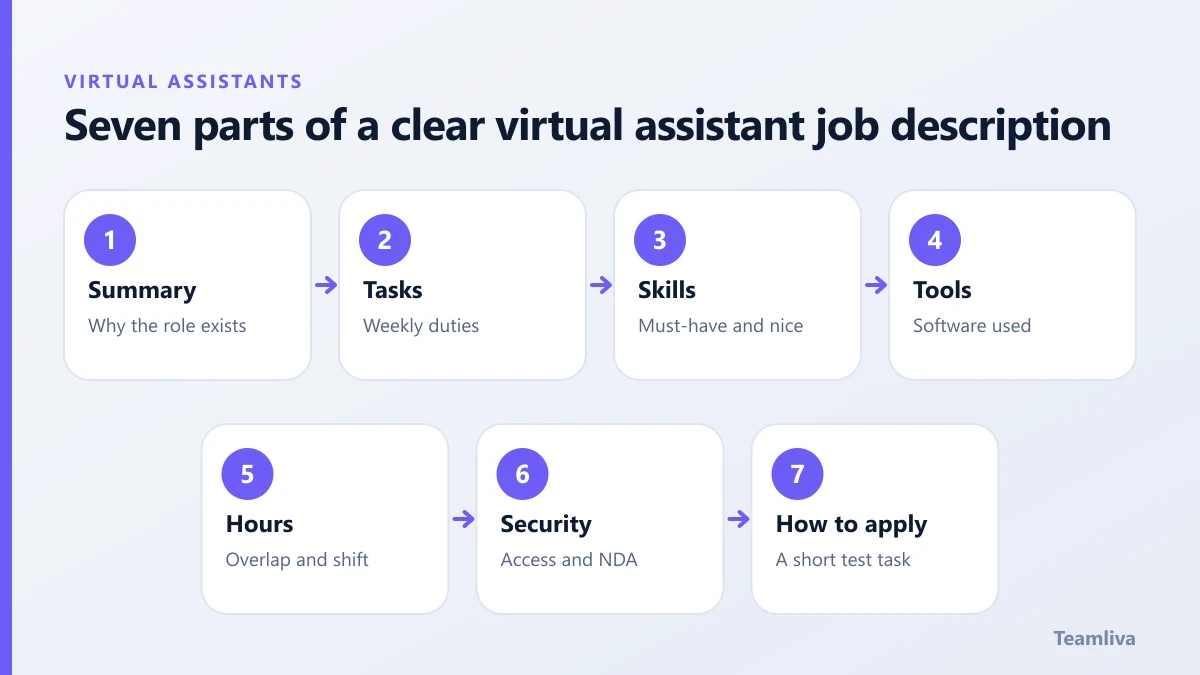
The seven parts of a good posting
1. Role summary
Two or three sentences: who you are, what the assistant will support and what a good result looks like.
2. Core responsibilities
List five to eight recurring tasks, in order of importance. Be specific:
- Manage the shared support inbox and reply within four business hours.
- Schedule and confirm client appointments in the calendar system.
- Enter new leads into the CRM and set follow-up reminders.
- Prepare weekly reports from a provided template.
3. Required skills
Separate must-haves from nice-to-haves. Must-haves might be excellent written English, attention to detail and comfort with the tools listed. Nice-to-haves might include prior experience in your industry.
4. Tools
Name the software so candidates can say honestly whether they know it: email, calendar, CRM, project board, messaging and any industry systems. See our virtual assistant tools and software guide.
5. Hours and time zone
State the weekly hours, the days, and the overlap you need with your team. If you work US hours with a remote assistant, be explicit; our note on time zone management helps you set this.
6. Security expectations
Say plainly that the role involves confidential data, that a confidentiality agreement is required and that access will be limited. This filters out casual applicants. See data security for virtual assistants.
7. How to apply
Ask for a short cover note and a small test task, for example "rewrite these three customer messages" or "clean this sample spreadsheet". You learn more from the test than from a résumé.

Sample job description you can copy
Virtual Assistant, Customer Support and Admin (Remote, US hours)
We are a small services company supporting US customers. We are looking for a reliable virtual assistant to manage our support inbox, schedule appointments and keep our records tidy.
Responsibilities
- Reply to customer emails and chats using our approved templates.
- Book, confirm and reschedule appointments.
- Update the CRM after each interaction.
- Prepare a short weekly summary of activity and open issues.
Requirements
- Excellent written English.
- Strong attention to detail and time management.
- Comfortable with email, calendar tools and a CRM.
- Able to work 20 hours per week between 9:00 and 17:00 US Eastern time.
Nice to have
- Previous customer support experience.
Security The role involves confidential customer data. You will sign a confidentiality agreement and receive access only to the systems you need.
To apply Send a short note about your experience and complete the attached three-message writing test.
Mistakes to avoid
- Listing thirty tasks. Candidates cannot tell what matters.
- Asking for "a rockstar" or other vague labels.
- Omitting hours, so applicants guess.
- Hiding the pay basis. State whether you pay hourly or monthly.
After you post
Screen with the test, shortlist three, and use structured interview questions for virtual assistants. Then follow the hiring steps.

Tips for writing a virtual assistant job description that attracts good applicants
- Use plain words. Avoid "rockstar", "ninja" and other vague labels.
- State the pay basis. Say hourly or monthly, even if the amount is negotiable.
- Show the context. One line about your business helps candidates decide whether they are a fit.
- Explain growth. If the role may grow into more responsibility, say so.
- Keep it under one page. Long posts attract volume, not quality.
Adjusting the template for different roles
- Customer support: add channels, response-time targets and escalation rules.
- Healthcare admin: name the systems, state that a confidentiality and business associate agreement is required and list privacy training expectations.
- E-commerce: list the platform, the catalogue size and the order volume per week.
- Bookkeeping: name the accounting software and state that approvals stay with you.
What to do with the applications
Sort applications into three piles: clear yes, maybe and no. Send the test task to the first two piles only. Score each test on the same four points: accuracy, clarity, tone and questions asked. Invite the top three to a short interview using the interview questions.

Prefer someone else to do the screening?
A managed provider assesses candidates for you and introduces only matches. Read about Teamliva’s virtual assistant services or send us your job description.
Frequently asked questions
What should a virtual assistant job description include?
A short summary, a list of tasks, required skills, the tools used, working hours and time zone, security expectations, and clear instructions on how to apply, ideally with a small test task.
How long should the job post be?
One page is enough. Clear, specific posts attract fewer but better-matched applicants than long, vague ones.
- #Teamliva
- #TeamLiva
- #VirtualAssistant
- #VirtualAssistantServices
- #HireAVirtualAssistant
- #VirtualAssistantJobDescription
- #HiringTemplate
- #JobPost