Social Media Virtual Assistant: What They Do and When to Hire One
A social media virtual assistant schedules posts, replies to comments and reports on results. See the tasks, what to prepare, and how to keep your brand voice consistent.

In this article
A social media virtual assistant schedules posts, replies to comments and messages, monitors mentions and reports results, following your brand guidelines and content plan. They carry out the routine so your social presence stays consistent.
Consistency beats bursts of effort on social media, and consistency is exactly what busy owners struggle with. A social media virtual assistant turns posting from a task you keep postponing into a routine that runs weekly. They do not replace strategy, but they carry out the plan reliably.
What a social media virtual assistant does
- Content calendar: planning posts across platforms around your goals and events.
- Formatting and scheduling: preparing text and images and scheduling them with a scheduling tool.
- Community management: replying to comments and messages using approved responses, and flagging complaints.
- Monitoring: watching mentions and relevant conversations.
- Research: collecting ideas, trending topics and examples from competitors.
- Reporting: summarising reach, engagement and clicks each week or month.
- Basic graphics: adapting your templates for different platforms.
For a broader look at where a virtual assistant fits, see digital marketing for small business basics.
What you need to prepare
The assistant can only be as consistent as your inputs. Give them:
- Brand voice notes: words you use, words you avoid, examples you like.
- Visual assets: logo, colours, fonts and templates.
- Content pillars: three to five topics you want to be known for.
- A reply guide: how to answer common questions and when to escalate.
- Approval rules: what can go out without your review.

Where a virtual assistant fits, and where it does not
A virtual assistant is well suited to execution: scheduling, replying and reporting. Strategy, creative direction, paid advertising budgets and crisis responses need more senior input. If you want strategy too, look at Teamliva’s digital marketing and growth service, or combine a strategist with an assistant.
Protecting your brand
- Use a scheduling tool with roles rather than sharing your password.
- Turn on multi-factor authentication on every account.
- Keep an approval step for sensitive topics.
- Store brand guidelines where the assistant can find them.
See virtual assistant data security for access rules.
Measuring results
Choose a few numbers and review them monthly: posting consistency, engagement rate, follower growth, link clicks and enquiries that came from social. Wikipedia’s overview of social media marketing explains the main concepts if you are new to the field. Compare against your own baseline, not against other brands.
Hiring tips
- Ask for a sample content calendar for your business.
- Give a short paid task, such as drafting one week of posts from a brief.
- Check writing quality carefully, since public posts represent you.
- Confirm familiarity with your platforms and tools.
- Use the interview questions to structure the conversation.

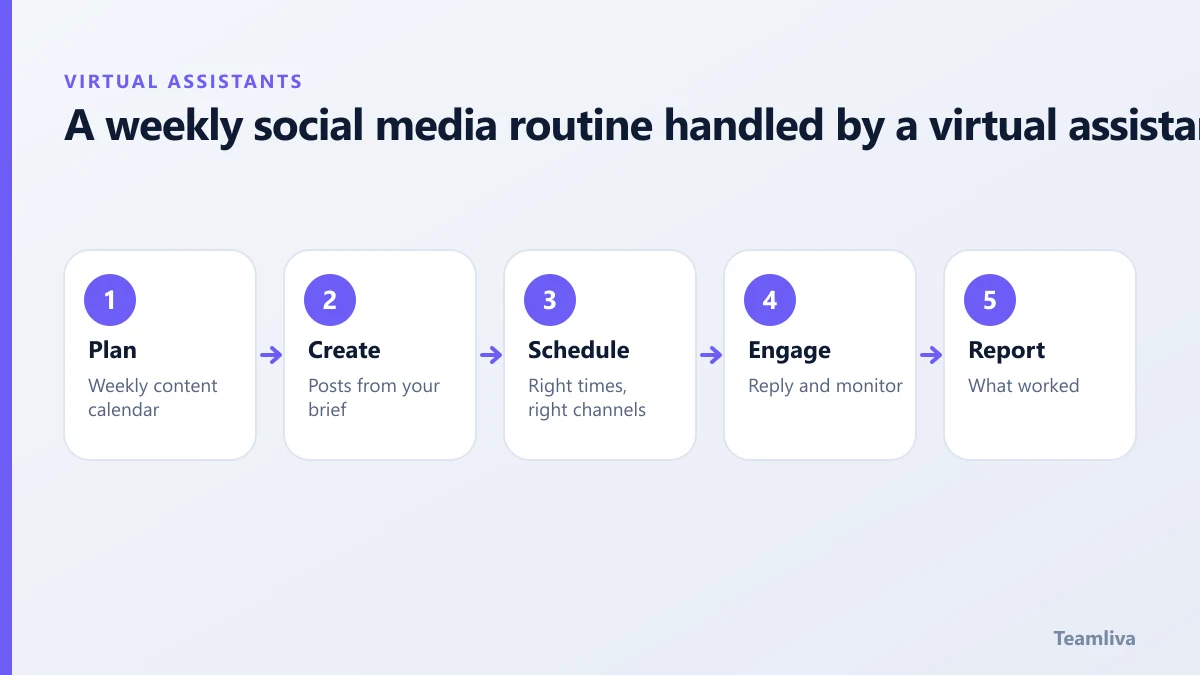
A simple weekly routine for a social media virtual assistant
- Monday: review last week’s numbers and confirm the plan for this week.
- Tuesday and Wednesday: prepare and schedule posts, adapting one idea for each platform.
- Thursday: engage: reply to comments, thank people who mention you and flag questions.
- Friday: send a short report and note ideas for next week.
The rhythm matters more than the volume. A steady schedule you can sustain beats a burst of posts followed by silence.
Content ideas your assistant can help gather
- Customer questions that could become short explainers.
- Behind-the-scenes photos of your team and work.
- Short quotes and lessons from your own guides.
- Milestones, launches and case results with permission.
- Seasonal or industry dates that suit your audience.
Tone and brand safety
Provide five examples of posts you love and five you dislike, with one line explaining why. Add a short list of topics to avoid, such as politics, and words you never use. Ask the assistant to draft, and for the first month approve before scheduling. If you have a team spread across time zones, keep a shared approval channel and a shared calendar so nothing goes out unreviewed.
Key takeaways: social media virtual assistant
- A social media virtual assistant delivers consistency: planned posts, quick replies and simple weekly reports.
- Give brand voice notes, templates, content pillars and approval rules before the first post.
- Keep strategy, paid budgets and crisis responses with a senior person.
- Use a scheduling tool with roles and multi-factor authentication instead of sharing passwords.
- Judge results against your own baseline: posting consistency, engagement, clicks and enquiries.

Work with Teamliva
Teamliva (Team Liva) provides managed virtual assistants for marketing support and can pair them with design and growth services. See our virtual assistant services or contact the team.
Frequently asked questions
What does a social media virtual assistant do?
They schedule posts, format content, reply to comments and messages, monitor mentions, gather performance numbers and keep a content calendar, following your brand guidelines.
Will a virtual assistant post on my behalf without approval?
Only if you agree that. Many businesses use an approval step until trust is built, then allow routine posts to go out on schedule.
- #Teamliva
- #TeamLiva
- #VirtualAssistant
- #VirtualAssistantServices
- #HireAVirtualAssistant
- #SocialMediaVirtualAssistant
- #SocialMediaManagement
- #ContentScheduling