
Bookkeeping Virtual Assistant: What They Can and Cannot Do
A bookkeeping virtual assistant can handle invoicing, expense tracking and reconciliation prep. Learn what to delegate, what needs an accountant and how to stay secure.
In this article
A bookkeeping virtual assistant handles routine financial admin such as invoicing, expense tracking, data entry and reconciliation preparation, while an accountant handles tax advice, filings and sign-off. Keep approvals and payment authority with you.
Bookkeeping is one of the tasks owners most want to escape and most fear delegating, because it involves money. The middle path is to hand over the routine recording work while keeping control of approvals and leaving professional judgement to an accountant. That is exactly where a bookkeeping virtual assistant fits.
Tasks a bookkeeping virtual assistant can take on
- Invoicing: creating and sending invoices from your rates, and chasing overdue payments with polite reminders.
- Expense tracking: collecting receipts, categorising transactions to your chart of accounts and flagging anything unclear.
- Data entry: recording sales, bills and payments in your accounting software.
- Bank reconciliation preparation: matching transactions and listing items that do not match for your review.
- Payroll data prep: compiling hours and details for whoever runs payroll.
- Reporting support: producing simple monthly summaries from your software.
This is a good example of a repeatable, documentable process, the type of work outlined in virtual assistant tasks to delegate.
What to keep with an accountant or yourself
- Tax advice, planning and filings.
- Year-end adjustments and financial statements sign-off.
- Approving payments and transfers.
- Setting up or changing your chart of accounts.
- Decisions about accounting treatment.
The IRS small business resources explain your obligations as a business owner in the US. An accountant should review the books regularly, even if an assistant maintains them daily.

Set up a safe process
- Give the minimum access. Prefer a limited role in your accounting software rather than an administrator account.
- Never share banking passwords. Use view-only access or exported statements where possible.
- Separate duties. The person who records payments should not be the only person who approves them.
- Use multi-factor authentication on accounting and bank logins.
- Keep an audit trail. Choose tools that log who changed what.
- Review monthly. Look at the reconciliation and a sample of entries.
See virtual assistant data security and the contract and NDA checklist.
How to hire
- Ask about experience with your accounting software.
- Give a small sample: categorise 30 transactions and explain unclear items.
- Check attention to detail and how they handle uncertainty. They should ask, not guess.
- Confirm they understand confidentiality.
Use the interview questions and the hiring steps.
Healthcare and billing note
Billing for medical practices is a specialist area involving claims, payer rules and compliance. That work belongs with a team that does it every day; see Teamliva’s medical billing and RCM service and medical billing KPIs to track.
Costs and value
Compare an assistant’s cost with the hours you spend and any late-payment costs from slow invoicing. Our pricing models guide shows how to compare options.

A monthly checklist for working with a bookkeeping virtual assistant
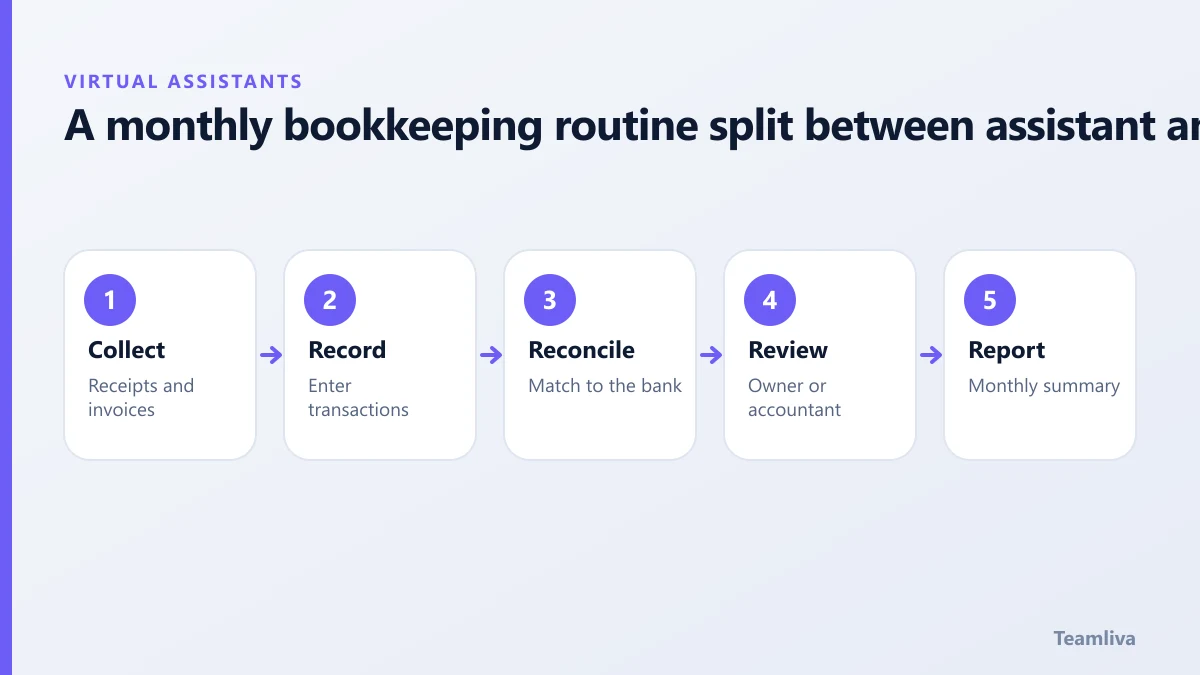
- By the 3rd: the assistant collects last month’s receipts, invoices and bank statements.
- By the 7th: transactions are entered and categorised, with questions listed.
- By the 10th: bank and card accounts are reconciled, with differences explained.
- By the 12th: you review a summary and answer questions.
- By the 15th: reports go to you and, if you use one, your accountant.
Agree the dates in advance and put them in a shared calendar.
Reducing errors
- Use a chart of accounts with clear descriptions, so categories are not guessed.
- Keep a short rules list, such as "software subscriptions go to this account".
- Ask the assistant to flag anything over an agreed amount rather than deciding alone.
- Review a random sample of entries each month.
- Keep a change log for any adjustment.
Working with your accountant
Introduce your accountant and assistant, and agree who does what. Ask the accountant what format they prefer for year-end, and what they want flagged during the year. A short call at the start prevents a lot of rework later. For a wider look at what to delegate, see tasks to delegate to a virtual assistant.
Key takeaways: bookkeeping virtual assistant
- A bookkeeping virtual assistant should record and prepare, while approvals, tax advice and sign-off stay with you and your accountant.
- Use limited-role access, never share banking passwords and turn on multi-factor authentication.
- Agree a monthly calendar for collecting, entering, reconciling and reviewing so nothing waits until year-end.
- Keep a short rules list for categories and ask the assistant to flag anything unusual.
- Introduce your accountant to the assistant so year-end is smooth.

Ready to delegate?
Teamliva (Team Liva) provides managed virtual assistants for back-office and finance-support tasks. See our virtual assistant services or contact us to describe your process.
Frequently asked questions
Can a virtual assistant do my bookkeeping?
A trained assistant can handle data entry, invoicing, expense categorisation and reconciliation preparation. Tax advice, filings and sign-off should stay with a qualified accountant.
How do I keep financial data safe with a virtual assistant?
Use view or limited-role access, never share bank passwords, require multi-factor authentication and keep payment approvals with you.
- #Teamliva
- #TeamLiva
- #VirtualAssistant
- #VirtualAssistantServices
- #HireAVirtualAssistant
- #BookkeepingVirtualAssistant
- #AccountingSupport
- #Invoicing