Medical Billing KPIs to Track Every Month (and What They Tell You)
You cannot improve what you do not measure. These medical billing KPIs show whether your revenue cycle is healthy and where to look when it is not.

In this article
A practice can be busy and still not know whether its billing is healthy. Reports full of numbers do not help unless you know which ones matter. The right medical billing KPIs turn data into decisions.
This guide covers the measures worth tracking, what each one signals and how to use them.
Speed: how fast money arrives
Days in accounts receivable
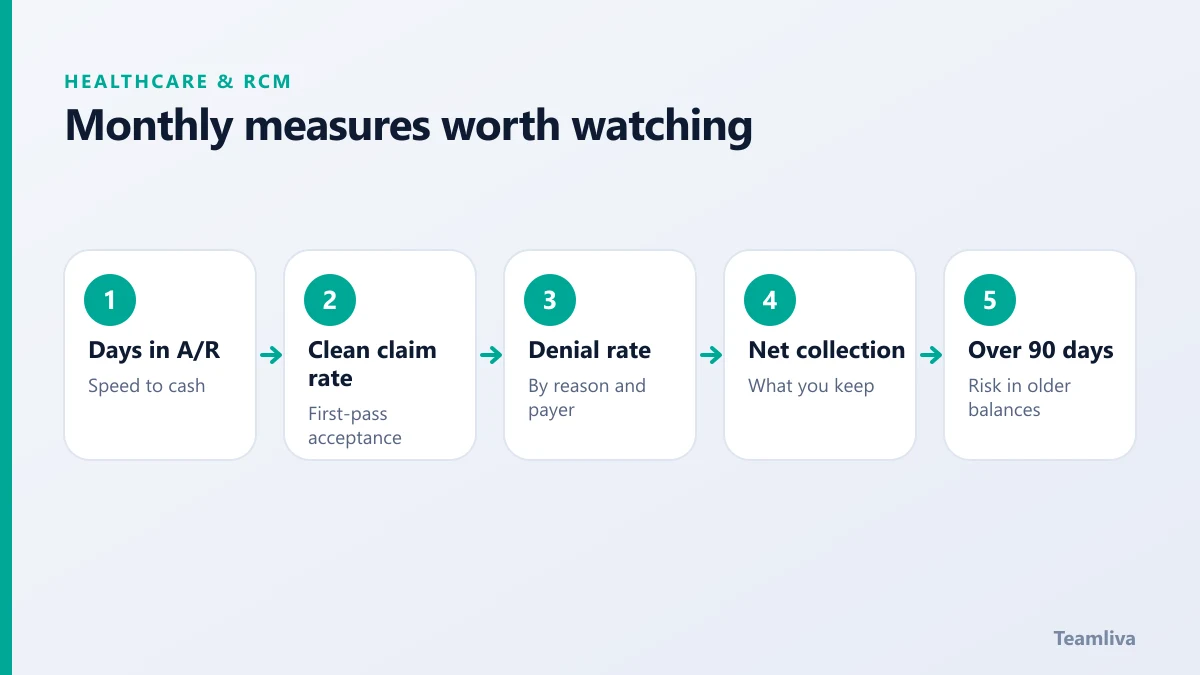
This is the average time it takes to collect payment after services are billed. A rising figure suggests slow submission, denials or weak follow-up. Track it monthly and by payer.
Days to submit
This measures the gap between the visit and claim submission. Long gaps delay everything after them and can risk filing deadlines.
Quality: how clean the claims are
Clean claim rate (first-pass acceptance)
The share of claims accepted on the first submission. A low rate points to registration, coding or data-entry problems. Improving it reduces rework across the whole cycle.
Denial rate
The share of claims denied by payers. Break it down by reason code, payer and provider. Our guide to medical claim denials shows how to turn the pattern into fixes.
Denial overturn rate
The share of appealed denials that end up paid. It shows how effective your appeals are and whether they are worth the effort.

Collections: how much you actually keep
Net collection rate
This compares what you collected with what you were entitled to collect after contractual adjustments. It shows how much of the allowable revenue you really capture.
Percentage of A/R over 90 days
Older balances are harder to recover. A growing share signals weak follow-up. See our guide to accounts receivable follow-up for a working routine.
Bad debt and write-off rate
Track how much revenue is written off and why. Some is unavoidable, but a rising trend deserves a closer look.
Patient experience: the front-end signals
Eligibility verification rate
The share of visits where coverage was checked before the appointment. Higher is better, because it prevents avoidable denials.
No-show and cancellation rate
Although it sits in operations, it affects revenue directly. Read patient scheduling and reducing no-shows for practical steps.
How to use the numbers
- Set a baseline. Record where you are today, by payer.
- Choose two priorities. Do not try to fix everything at once.
- Review monthly. Look at trends, not single months.
- Ask why. A number tells you where to look, not the cause.
- Assign owners. Every KPI needs a person responsible.
- Feed fixes back. Change the upstream step that caused the problem.
Avoid common traps
- Tracking too many measures and acting on none.
- Using averages that hide a struggling payer.
- Comparing your figures with others without matching specialty and payer mix.
- Reviewing numbers without agreeing next steps.
Simple monthly review agenda
- Days in A/R and the over-90 share.
- Clean claim and denial rates.
- Top three denial reasons and payers.
- Progress on last month's action items.
- One improvement to try next month.

Setting targets for medical billing KPIs
A number without a target is only a fact. Once you have a baseline, set a modest goal for each measure.
- Days in A/R. Aim to move the figure down steadily, not to hit a perfect number overnight.
- Clean claim rate. Set a target for each payer, because some payers reject more often than others.
- Denial rate. Pick the top two denial reasons and aim to reduce them first.
- Percentage over 90 days. Aim for a decline each month.
Review the targets every quarter. As results improve, raise the standard.
Building a simple dashboard
You do not need complex software. A single page can show:
- Each medical billing KPI for the current month.
- The same figure for the previous three months.
- A colour or arrow that shows the trend.
- A note explaining any large change.
Keep the page short enough to read in five minutes. Share it with the billing team, the practice manager and the clinicians who influence documentation.
Turning KPIs into action
Every review should end with an owner and a date. For example: "Registration will double-check subscriber IDs for the two payers with the highest rejections, starting next week." Then confirm at the next meeting whether it happened and whether the number moved. Measurement without follow-through only creates paperwork.
How Teamliva helps
Teamliva's remote medical billing and RCM teams report on these measures regularly and act on what they find, from claim scrubbing to denial analysis. See our medical billing and RCM services, read what revenue cycle management is or contact us.
For definitions and industry context, the Healthcare Financial Management Association publishes revenue cycle guidance.
Quick reference: where to look when a number moves
- Days in A/R rising: check submission delays, denials and follow-up.
- Clean claim rate falling: check registration, coding and payer edits.
- Denial rate rising: group denials by reason and payer, then fix the top cause.
- Over-90-day share growing: review who owns aging claims and how often they are worked.
- Net collection rate dropping: look for underpayments and write-offs.
Each signal points to a step in the cycle. Start there, and confirm the fix worked in next month's figures.

The takeaway
Choose a small set of medical billing KPIs, track them by payer every month and act on what they show. Measurement is only useful when it leads to a fix.
Frequently asked questions
How many billing KPIs should we track?
A handful is enough. Focus on five to eight measures that cover speed, quality and collections, then review them monthly and by payer.
Should KPIs be tracked by payer?
Yes. Overall averages hide problems. Breaking results down by payer, provider and service line shows exactly where to act.
What is a clean claim rate?
It is the share of claims that pass payer checks and are accepted on the first submission, without rework. A higher rate means fewer delays.
- #Teamliva
- #TeamLiva
- #MedicalBilling
- #RCM
- #HealthcareBPO
- #MedicalBillingKpis
- #RevenueCycle
- #Analytics