Patient Scheduling: How to Fill Your Calendar and Cut No-Shows
Empty slots and missed appointments cost practices time and revenue. Use these patient scheduling practices to improve attendance, fill gaps and reduce front-desk stress.
In this article
A full, well-organised calendar is the heartbeat of a healthcare practice. Yet many practices lose a meaningful part of each week to no-shows, late cancellations and gaps that nobody fills. Better patient scheduling can win that time back.
This guide covers practical steps that work in clinics of any size.
Why scheduling problems are expensive
Every empty slot represents clinician time that cannot be recovered. It also affects patients who waited longer for an appointment that could have been used. And when the front desk is firefighting the schedule, other tasks suffer.
Good scheduling is not only about booking. It is about confirming, adjusting and filling.
Build smarter slot rules
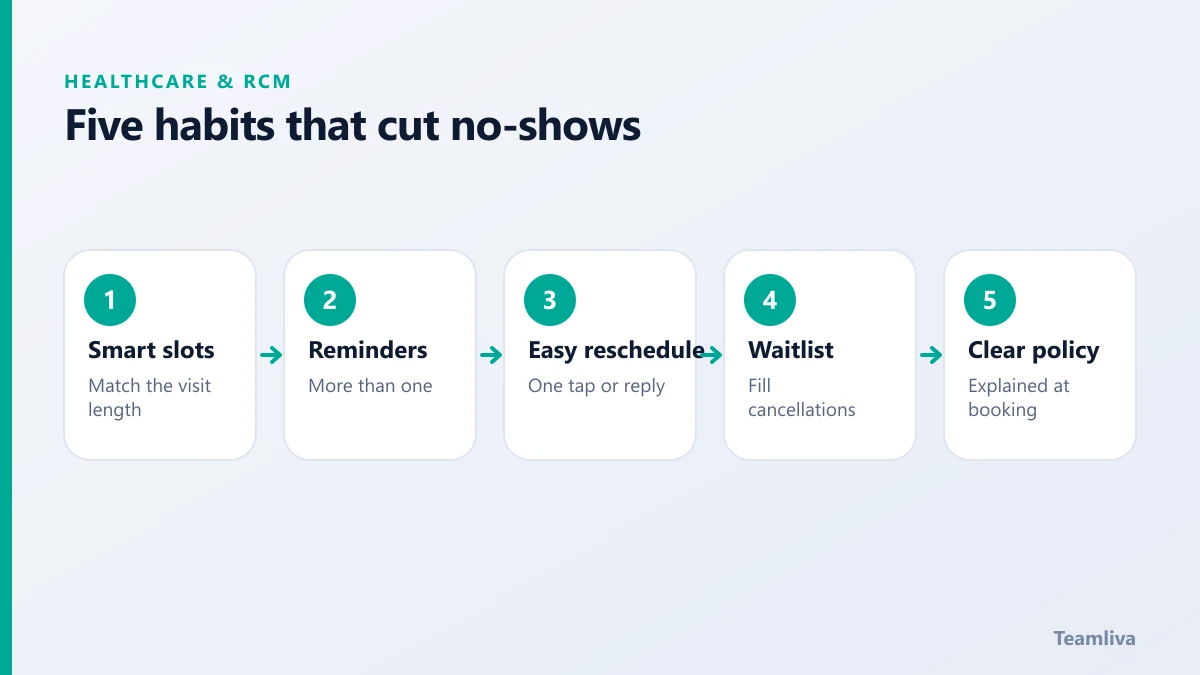
- Match the slot to the visit. Give new-patient visits and follow-ups different lengths.
- Use buffers wisely. Small gaps between complex visits protect the day from running late.
- Group similar visits. Blocks for procedures or telehealth reduce switching.
- Reserve capacity. Keep a few slots open for urgent needs.

Make reminders work
Reminders are the most effective low-cost step you can take.
- Ask for the preferred channel at booking: text, email or phone.
- Send more than one reminder. A first notice a few days ahead and a second closer to the visit is common.
- Make confirming simple. One reply or one tap should be enough.
- Offer an easy way to reschedule. If it is hard to change, patients simply do not turn up.
- Include practical details. Location, arrival time, what to bring and how to cancel.
Keep a waitlist and fill cancellations fast
When someone cancels, the clock starts. A ready waitlist lets you offer the slot to another patient within minutes. Record who wants earlier appointments and which days suit them. Then contact them in a fixed order.
Set a clear attendance policy
Explain your cancellation and no-show policy at booking and in the reminder. Keep it fair and consistent. Patients respond better to clear expectations than to surprise fees.
Verify insurance before the visit
Scheduling and eligibility belong together. Checking coverage before the appointment prevents day-of surprises and later denials. Our guide to medical claim denials explains how front-desk errors turn into billing problems, and what revenue cycle management is shows where scheduling sits in the cycle.
Measure and improve
Track these figures monthly:
- No-show rate and late cancellation rate.
- Fill rate for cancelled slots.
- Average days until the next available appointment.
- Confirmation rate from reminders.
Look at the data by clinician, visit type and day of the week. Patterns often point to a simple fix.
Give the front desk breathing room
Phones, check-in and scheduling all compete for the same people. Moving the scheduling workflow to a dedicated remote team frees on-site staff to look after patients in the building. A medical virtual assistant can handle booking, reminders, rescheduling and waitlists inside your existing system.
Patient information must be protected, so confirm the safeguards first. The US Department of Health and Human Services describes the requirements.

Improving patient scheduling for different visit types
One approach does not suit every visit. Adjust your rules to the type of care.
- New-patient visits. Allow extra time for forms, history and questions. Send intake forms in advance.
- Follow-ups. Shorter slots work, and reminders should mention what to bring.
- Procedures. Confirm preparation instructions, fasting or transport needs with the patient before the day.
- Telehealth. Send the link early, explain the technology and offer a quick test option.
Handling late arrivals and overruns
Delays cascade through the day. Agree a simple policy so staff do not improvise.
- Decide how long a late patient can be seen, and when to reschedule.
- Give the front desk a script that is polite and consistent.
- Watch for visit types that regularly overrun, and lengthen those slots.
- Review the daily schedule the evening before and flag tight spots.
Using data to plan capacity
Look at the busiest days and hours, common visit lengths and the times when cancellations cluster. If Mondays have the most no-shows, add an extra reminder. If afternoon slots stay empty, offer them to waitlist patients first. Small changes based on your own data usually outperform generic advice.
For a wider view of front-end workflow and its link to revenue, read our overview of revenue cycle management.
How Teamliva helps
Teamliva supplies HIPAA-aligned remote teams for scheduling, patient communication and front-office support. Each professional is assessed, works under agreed service levels and has a named team lead. Explore our healthcare staffing services or talk to our operations desk.
Quick checklist for a smoother week
- Review tomorrow's schedule each afternoon and flag risky gaps.
- Send reminders through the channel each patient prefers.
- Keep the waitlist current, with contact details and preferred times.
- Confirm insurance details before the visit, not at check-in.
- Explain the cancellation policy in plain words at booking.
- Look at no-show data monthly by day and visit type.
Small, consistent habits usually beat big projects, and they are easy for a front-desk team or a remote assistant to follow every day.

The takeaway
Better patient scheduling combines smart slot rules, reliable reminders, a working waitlist and clear policies. Measure the results monthly and improve one step at a time.
Frequently asked questions
How can we reduce patient no-shows?
Send timely reminders by the patient's preferred channel, make confirming and rescheduling easy, keep a waitlist to fill cancellations and explain your attendance policy clearly when booking.
When should reminders be sent?
Many practices send a first reminder a few days before and a second closer to the visit. Test timings with your own patients and adjust based on results.
Can scheduling be handled remotely?
Yes. A trained remote team can manage bookings, reminders, rescheduling and waitlists using your existing systems, with the right privacy safeguards.
- #Teamliva
- #TeamLiva
- #MedicalBilling
- #RCM
- #HealthcareBPO
- #PatientScheduling
- #NoShows
- #HealthcareOperations
- #FrontDesk