How to Hire a Virtual Assistant: A Step-by-Step Guide
Hiring the right virtual assistant takes a clear brief, a fair test and a proper start. Follow this step-by-step process to choose well and avoid the common mistakes.
In this article
Many owners decide to hire a virtual assistant when they are already overloaded. That is understandable, but it is also when a rushed decision is most likely. A little structure up front makes the difference between a helpful long-term partner and a costly restart.
Here is a six-step process you can follow.
Step 1: Define the work, not the job title
Start by listing what you want off your plate. Track your own week for a few days. Note every task that is repeatable, rules-based or time-consuming.
Then group the tasks into one or two workflows. A clear brief might read: "Manage the shared inbox, book appointments and prepare a weekly summary." That is far more useful than "general admin help".
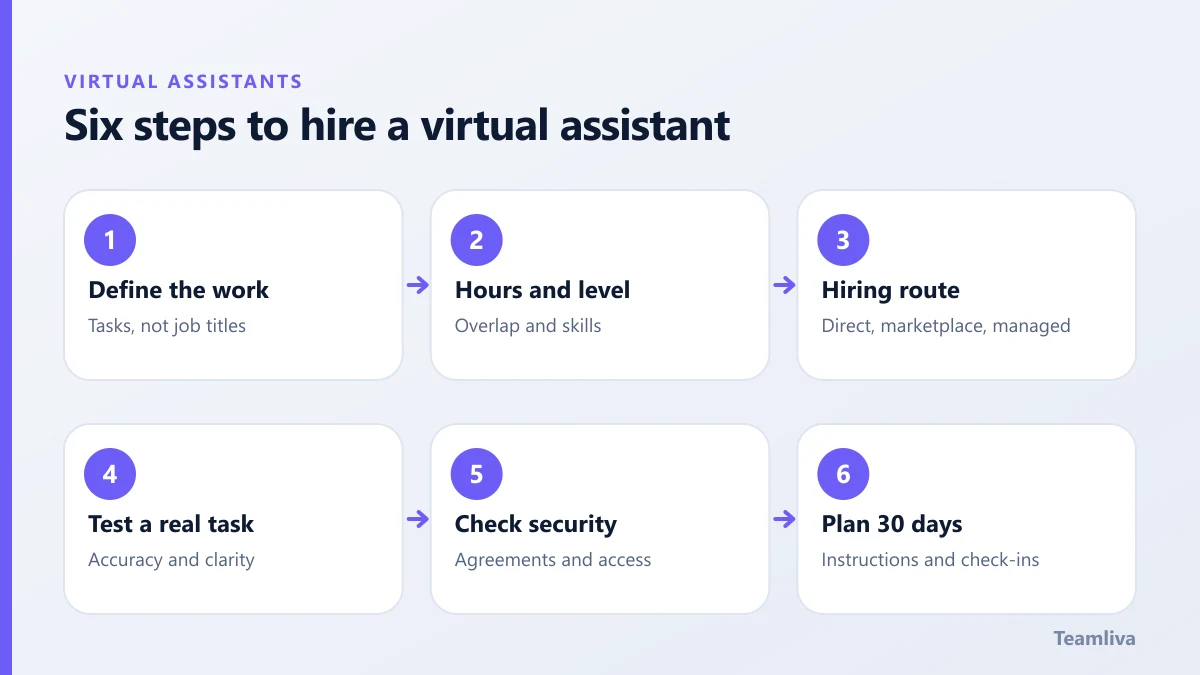
Step 2: Decide the hours and the level
Decide how many hours you need and when. Do you need overlap with your time zone, or coverage outside your working day? Also decide the experience level. A simple data entry role differs from a role that needs judgement and independent decisions.

Step 3: Choose your hiring route
There are three common ways to hire a virtual assistant:
- Direct hire. You advertise, screen and manage the person yourself. You have full control, and you also carry all the effort.
- Freelance marketplaces. These offer choice, but quality varies and you still do the vetting.
- Managed provider. A company assesses candidates, places them and provides supervision and backup. This costs more per hour than a raw freelancer, but it reduces risk and management time.
Our comparison of virtual assistant vs employee vs freelancer explains the trade-offs in more detail.
Step 4: Test skills with a real task
Do not rely on a CV alone. Give each finalist a short, realistic task. For an admin role, that might be sorting a sample inbox and drafting replies. For a data role, it might be cleaning a small spreadsheet.
Judge three things: accuracy, clarity of communication and how they handle missing information. Someone who asks a smart question is often better than someone who guesses.
Step 5: Check security and confidentiality
Before access is granted, agree the rules. A sensible baseline includes:
- A signed confidentiality agreement.
- Access only to the systems the role needs.
- Unique logins and multi-factor authentication, never shared passwords.
- A clear process for reporting mistakes or incidents.
If health data is involved, follow the requirements described by the US Department of Health and Human Services. See also our guide to virtual assistant data security.
Step 6: Plan the first 30 days
A good start protects everything that follows. Prepare written instructions, introduce the tools and agree a daily check-in for the first two weeks. Then move to a weekly review. Our article on how to onboard a virtual assistant gives a full checklist.
Common mistakes to avoid
- Hiring for price alone.
- Handing over too many tasks at once.
- Leaving instructions in your head.
- Skipping feedback in the first month.

Mistakes to avoid when you hire a virtual assistant
Even careful owners repeat the same errors. Watch for these:
- Hiring for the lowest price. A cheaper rate can cost more if you must redo the work or spend hours on supervision.
- Skipping the trial. A CV cannot show how someone handles a real task with missing details.
- Vague scope. If you cannot describe the first month of work, you are not ready to hire yet.
- Sharing too much access at once. Start with the systems the first workflow needs, and add more later.
- No feedback loop. Silence in the first weeks lets small problems become habits.
Interview questions worth asking
A good interview reveals how a person thinks. Try questions such as:
- Describe a time you received unclear instructions. What did you do?
- How do you prioritise when three urgent requests arrive together?
- Which tools are you comfortable with, and which would you need to learn?
- How do you protect confidential information when you work from home?
- What hours can you reliably cover, and how do you handle time off?
Listen for clear, specific answers. Vague replies often predict vague work.
Check references and working conditions
Ask for one or two references from similar work, and confirm practical details: a stable internet connection, a quiet workspace, a backup plan for power cuts and a suitable device. A managed provider usually handles these checks for you, which is one reason many businesses choose that route.
Hire faster with Teamliva
If you would rather not screen candidates yourself, Teamliva prepares the shortlist. Every professional clears a skills assessment, works under agreed service levels and is supported by a team lead. Talk to us through the contact page and we will help you scope the role.

The takeaway
To hire a virtual assistant well, define the work, pick the right route, test with a real task and set clear security rules. Then invest in a proper start.
Frequently asked questions
How long does it take to hire a virtual assistant?
It depends on the route. Recruiting directly can take several weeks. Working with a managed provider that already assesses candidates can be much faster, because the shortlist is prepared for you.
What should I look for in a virtual assistant?
Look for clear written communication, reliability, comfort with the tools you use and the ability to follow a process. Role-specific skills matter, but attitude and dependability predict success just as strongly.
Should I run a paid trial before committing?
A short paid trial on a real task is one of the best ways to judge fit. Keep it small, define what good looks like and review the result together.
- #Teamliva
- #TeamLiva
- #VirtualAssistant
- #VirtualAssistantServices
- #HireAVirtualAssistant
- #HireVirtualAssistant
- #Recruitment
- #RemoteStaffing
- #Delegation