IT Helpdesk Outsourcing: How It Works and What to Expect
IT helpdesk outsourcing explained: Tier 1 vs Tier 2 support, 24/7 coverage, the SLAs and metrics to agree, security controls and how to switch smoothly.
In this article
IT helpdesk outsourcing means an external team answers your users’ IT requests, usually Tier 1 issues like password resets, access and basic troubleshooting, and escalates the rest to your engineers with clear notes. It gives faster responses and frees senior staff for project work.
Who uses an outsourced helpdesk
- Managed service providers that need more Tier 1 capacity or overnight cover.
- SaaS companies that need product support for their customers.
- Growing businesses without a dedicated internal IT team.
- Internal IT teams whose engineers spend too much time on simple tickets.
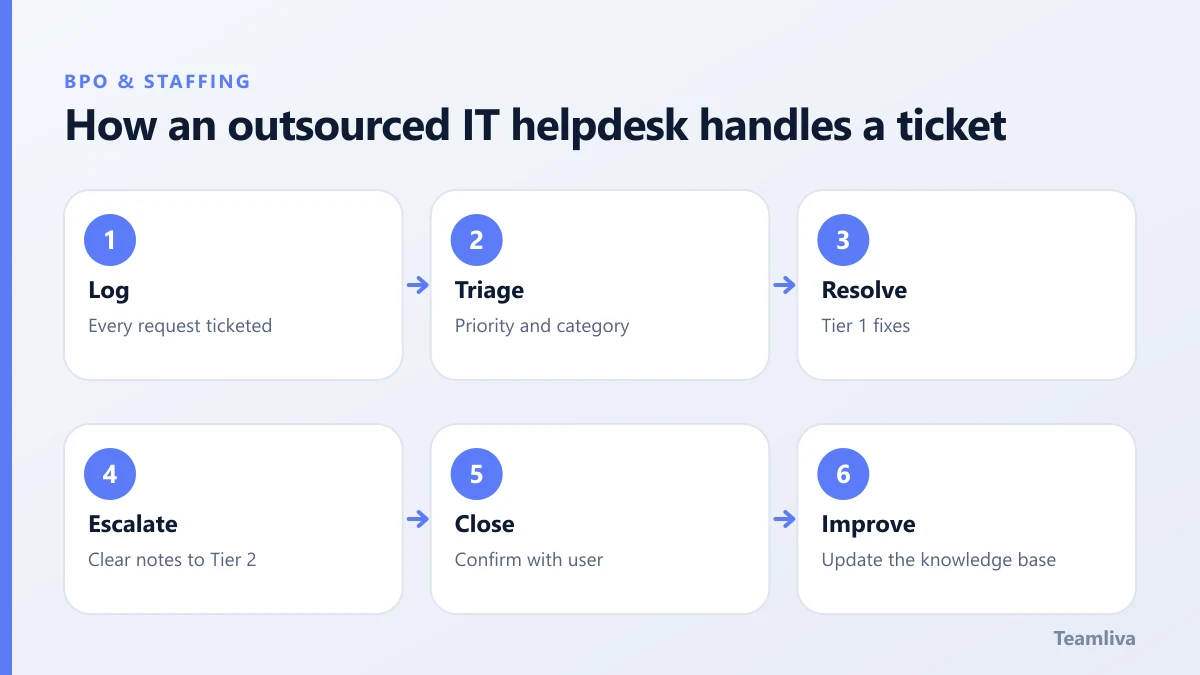
Tier 1 vs Tier 2: where to draw the line
Tier 1 covers requests that follow a known procedure: password resets, account unlocks, onboarding and offboarding, printer and email issues, and basic software problems. Tier 2 covers deeper troubleshooting, configuration changes and anything that needs system-level access. Most companies outsource Tier 1 first, then add Tier 2 once trust and documentation are in place.

Coverage options
You can outsource business hours only, after-hours and weekends only, or full 24/7 support in shifts. Offshore teams are well suited to covering US nights, as our article on offshore staffing for US and UK companies explains.
SLAs and metrics to agree
Put these in writing before you start:
- First response time by priority.
- Resolution time by priority.
- First contact resolution rate for Tier 1.
- Escalation rate and quality of escalation notes.
- Backlog of open tickets.
- User satisfaction after each ticket.
Our guide to what to include in a BPO service level agreement explains how to set targets and remedies.
Security controls for helpdesk work
Helpdesk staff can reset passwords and grant access, so security matters. Require identity verification before every reset, least-privilege admin roles, managed devices, multi-factor authentication, full ticket audit trails and fast removal of access when staff change.
How to switch smoothly
- Document your top 30 ticket types with step-by-step fixes.
- Give read access first, then admin rights as each procedure is proven.
- Shadow for a week, with your team reviewing every ticket.
- Go live on one shift, such as overnight, before full coverage.
- Review weekly, and turn repeat tickets into knowledge-base articles.
Building a knowledge base the team can rely on
An outsourced helpdesk is only as good as its documentation. Start with your thirty most common ticket types and write a short article for each: the symptom users describe, the questions to ask, the fix step by step and when to escalate. Add screenshots of every admin screen involved.
Ask the team to propose a new article whenever they solve a ticket that is not documented, and review those drafts weekly. Within a few months, most repeat issues have a written answer, first contact resolution rises and escalations fall. A good knowledge base also makes onboarding new team members faster and protects you if you ever change provider.

Writing escalation notes that save time
Poor escalations waste more engineering time than almost anything else. Agree a simple template: what the user reported, who they are and how they were verified, what was tried, what happened and what the user needs next. Engineers should be able to pick up the ticket without contacting the user again. Review a sample of escalations every week in the first month and give specific feedback.
Handling the first month
Expect the first two weeks to be slower while the team learns your environment. Keep a daily fifteen-minute check-in, track every ticket that needed help from your engineers and turn each one into documentation. By the end of the first month, response times should be faster than before and your engineers should feel the reduced interruption.
When to add Tier 2
Once Tier 1 metrics are steady for two or three months, consider moving defined Tier 2 tasks, such as standard configuration changes or software deployments, to the same team. Do it one task at a time, with written procedures and limited permissions. Keep your own engineers as the final approval for anything that changes production systems, at least until the team has a long record of safe changes.
Key takeaways: IT helpdesk outsourcing
- IT helpdesk outsourcing usually starts with Tier 1: password resets, access, onboarding and basic troubleshooting.
- Agree response time, resolution time, first contact resolution, escalation rate and satisfaction targets in writing.
- Require identity checks before resets, least-privilege roles, multi-factor authentication and full audit trails.
- A shared knowledge base and a clear escalation template are what make an outsourced helpdesk fast.
- Go live on one shift first, then expand coverage and add defined Tier 2 tasks once metrics are steady.

How Teamliva helps
Teamliva (Team Liva) provides Tier 1 helpdesk and product support teams that work in your ticketing tools against your SLAs. Our IT helpdesk blueprint shows a typical team, and our customer support outsourcing services explain how we run it. Contact us to scope your queue.
For an industry framework for IT support, see ITIL on Wikipedia.
Frequently asked questions
What does an outsourced IT helpdesk handle?
Usually Tier 1 support: password resets, account access, onboarding and offboarding, basic software and device issues, ticket triage and escalation with clear notes.
Which metrics should an IT helpdesk SLA include?
First response time, resolution time by priority, first contact resolution, escalation rate, ticket backlog and user satisfaction.
Can an outsourced helpdesk provide 24/7 support?
Yes. Offshore teams in other time zones are often used to cover nights and weekends, or the whole day in shifts.
- #Teamliva
- #TeamLiva
- #BPO
- #Outsourcing
- #RemoteStaffing
- #ItHelpdeskOutsourcing
- #OutsourcedHelpDesk
- #Tier1Support
- #ServiceDeskOutsourcing