Omnichannel Customer Support: What It Is and How to Build It
Customers move between email, chat, phone and social media. Omnichannel customer support keeps the conversation connected. Learn how it works and how to set it up.
In this article
Customers no longer stay in one place. Someone might start on your website chat, follow up by email and finally phone with a question. If each channel is a separate island, they must explain everything again. That is frustrating, and it costs you goodwill.
Omnichannel customer support solves this by connecting every channel into one conversation.
Multichannel versus omnichannel
The two terms are often confused.
- Multichannel. You offer several ways to get in touch, but each works on its own.
- Omnichannel. The channels share information, so the agent sees the customer's history wherever they contact you.
The difference is continuity. In an omnichannel setup, a customer can switch channels without starting over.
Why it matters
- Less repetition. Customers do not have to repeat themselves.
- Faster resolution. Agents have context from the first minute.
- Consistent answers. One knowledge base feeds every channel.
- Better insight. You can see the whole journey and spot recurring issues.

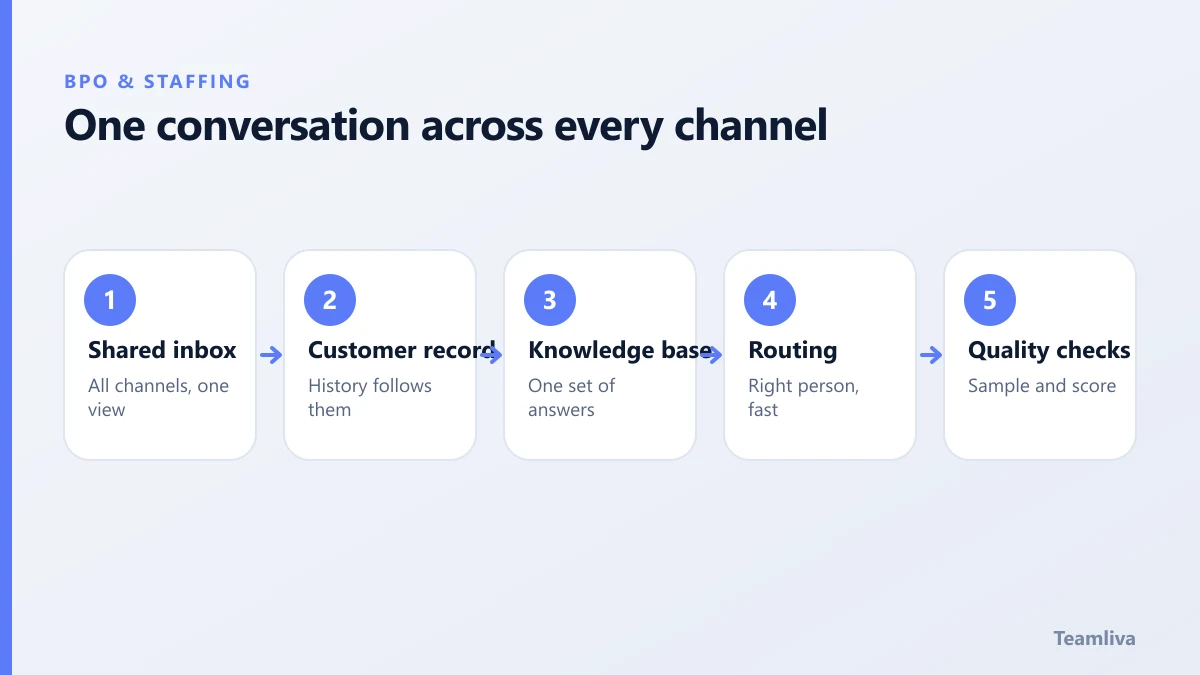
The building blocks
A shared inbox or help desk
One system should hold conversations from email, chat, social messages and phone notes. It gives every agent the same view.
A single customer record
Link contacts, orders and past conversations. Even a simple, well-kept record helps.
A living knowledge base
Store answers, policies and step-by-step guides in one place, and keep it up to date. Consistent answers depend on it.
Clear routing and escalation
Decide which questions go to whom, and how fast. Define what counts as urgent and who steps in when a case is complex.
Quality checks
Review a sample of conversations regularly. Score tone, accuracy and resolution, and give agents feedback.
How to set it up
- List your channels and volumes. See where customers already contact you.
- Choose your core channels. Start with two or three you can staff well.
- Pick a shared tool. Choose a system that brings them together.
- Write the playbooks. Document common issues, tone and escalation rules.
- Set service levels. For example, first response targets by channel.
- Train the team. Use real examples and role-play difficult cases.
- Review and refine. Study the data monthly and adjust.
Our guide to customer support outsourcing walks through the outsourcing side step by step.
Metrics that matter
- First response time. By channel.
- Resolution time. How long until the issue is closed.
- First-contact resolution. The share solved without follow-up.
- Customer satisfaction. Ratings or survey scores.
- Reopen rate. A signal of unresolved problems.
Common pitfalls
- Adding channels faster than you can staff them.
- Keeping separate tools that do not talk to each other.
- An outdated knowledge base.
- No plan for after-hours coverage.
Coverage across time zones
Customers expect help outside office hours. A managed remote team can extend coverage into evenings, nights and weekends, using shared playbooks and tools. Agree service levels in writing, as described in BPO service level agreements.
For accessibility guidance on chat and web support tools, see the Web Content Accessibility Guidelines.

Choosing channels for omnichannel customer support
Each channel has strengths. Match them to your customers and your team.
- Email. Good for detailed questions and records. Response expectations are measured in hours.
- Live chat. Fast and convenient for quick questions during browsing or checkout.
- Phone. Best for urgent, sensitive or complicated problems.
- Social messaging. Useful where customers already spend time, but public, so tone matters.
- Self-service help centre. Resolves common questions without an agent and reduces volume.
Add channels one at a time, and only when you can meet the response targets.
Handling handoffs between channels
The value of an omnichannel approach lies in the handoff. When a customer moves from chat to email, the agent should see the earlier conversation. Give agents these habits:
- Read the history before replying.
- Summarise the issue in the ticket in a sentence or two.
- Use consistent tags so patterns are easy to find.
- Never ask the customer to repeat information that is already recorded.
Using feedback to improve
Look at the reasons customers contact you. If many questions are about delivery times or password resets, improve the help centre or the product page. Every question you prevent is a better experience for the customer and a lower workload for the team. Share the top contact reasons with the wider business each month.
How Teamliva helps
Teamliva's BPO pods provide omnichannel support for e-commerce, SaaS and healthcare brands, covering email, chat and phone with quality audits built into the workflow. See our BPO and staffing solutions or contact us.
Quick checklist for your first three months
- Month one: choose two channels, pick a shared tool and write the playbooks.
- Month two: train the team, set response targets and start sampling conversations.
- Month three: review the data, improve the help centre and decide whether to add a channel.
Keep the plan modest. A small setup that runs well earns customer trust and gives you the evidence you need to grow it.

The takeaway
Omnichannel customer support keeps the conversation connected across channels. Start with a few channels, share one view of the customer and measure the results. Customers notice the difference.
Frequently asked questions
What is the difference between multichannel and omnichannel support?
Multichannel means you offer several channels, but they may work separately. Omnichannel connects them, so the customer's history and context follow them from one channel to the next.
Do I need every channel?
No. Start with the channels your customers already use, and add more when you can support them well. A few well-run channels beat many neglected ones.
Can omnichannel support be outsourced?
Yes. A managed team can cover email, chat and phone using your knowledge base and tools, and escalate complex cases to your staff.
- #Teamliva
- #TeamLiva
- #BPO
- #Outsourcing
- #RemoteStaffing
- #Omnichannel
- #CustomerSupport
- #CustomerExperience